
A company that makes films, television programmes, animation or video games, or produces theatre, orchestral concerts or museum and gallery exhibitions, can claim one of the UK’s creative industry tax reliefs. Every one of them is claimed on CT600P, a supplementary page of the Company Tax Return, and box 96 on the CT600 is ticked to say it is attached. This guide explains which relief applies, why an expenditure credit of £170,000 turns into a cash payment of less than that, how to enter the claim in Tax Optimiser, and what every box on the form means.
Which relief applies
The CT600P carries two different families of relief, and the form has separate sections for each:
- Expenditure credits — the Audio-Visual Expenditure Credit (AVEC) for film, high-end TV, animation, children’s TV and independent film, and the Video Games Expenditure Credit (VGEC). These replaced the old film, TV and video games reliefs from 1 January 2024. They are “above the line”: a taxable credit, worked through a six-step calculation to a payable amount (boxes P5–P255).
- Additional-deduction reliefs — the cultural reliefs (theatre, orchestra, museum and gallery exhibition) and the legacy Film, High-end TV, Children’s TV, Animation and Video Games Tax Reliefs. These give an extra deduction from taxable profits and, where that creates a loss, let the company surrender the loss for a payable tax credit (boxes P260–P330).
| Relief | Rate | Notes |
|---|---|---|
| AVEC — film and high-end TV | 34% of qualifying expenditure | About 25.5% after the notional tax at 25%. Qualifying expenditure is capped at 80% of core expenditure. |
| AVEC — animation and children’s TV | 39% | About 29.25% net. |
| AVEC — independent film | 53% | Films with a core budget under £23.5 million, principal photography starting on or after 1 April 2024; claims from 1 April 2025. |
| AVEC — visual effects | An extra 5% (39% in total) | On UK visual-effects costs of a standard-rate film or high-end TV programme, which are also outside the 80% cap. Reported in column E. |
| VGEC — video games | 34% | Same 80% cap on qualifying expenditure. |
| Theatre, museum and gallery exhibitions | 40% non-touring, 45% touring | Permanent rates from 1 April 2025. |
| Orchestra | 45% | Permanent rate from 1 April 2025. |
| Legacy Film/TV/Games reliefs | — | New productions have had to claim AVEC or VGEC since 1 April 2025; the old reliefs close to all productions on 1 April 2027. |
Two conditions sit in front of all of them: the production must be certified as British (by the BFI for film, TV and games) or otherwise meet the relief’s cultural and UK-spend tests, and the company claiming must be the one responsible for the production. Tax Optimiser does not test eligibility — it takes the expenditure figures you enter as correct.
How an expenditure credit works, in plain English
AVEC and VGEC are paid in a way that surprises people the first time:
- The credit is income. It goes into the profit and loss account like a grant, so it is taxed. In the accounts it is usually shown as other operating income, and Tax Optimiser picks it up from the trial balance like any other income — it does not add it for you.
- It pays the company’s own Corporation Tax first. Step 1 sets the credit against the Corporation Tax for the period.
- Then a notional tax charge is taken off. Step 2 works out tax on the whole credit at the main rate (25%). If what is left of the credit after Step 1 is more than the credit net of that notional tax, the excess cannot be paid out this year — it is restricted and carried forward.
- Whatever survives is paid in cash, unless you choose to use it against another period’s tax, surrender it to a group company or set it against other liabilities (Steps 3 to 5). Step 6 is the payable amount, and it goes in box 886 of the CT600.
So a £170,000 credit is worth £127,500 in cash plus whatever Corporation Tax it pays at Step 1 — not £170,000 in cash. The worked example below goes through every step.
Enter the claim in Tax Optimiser
Open the accounting period’s Corp Tax workspace and choose Creative Industries in the left-hand menu. Entering any figure here attaches the CT600P and ticks box 96; clear them all and the page comes off again.
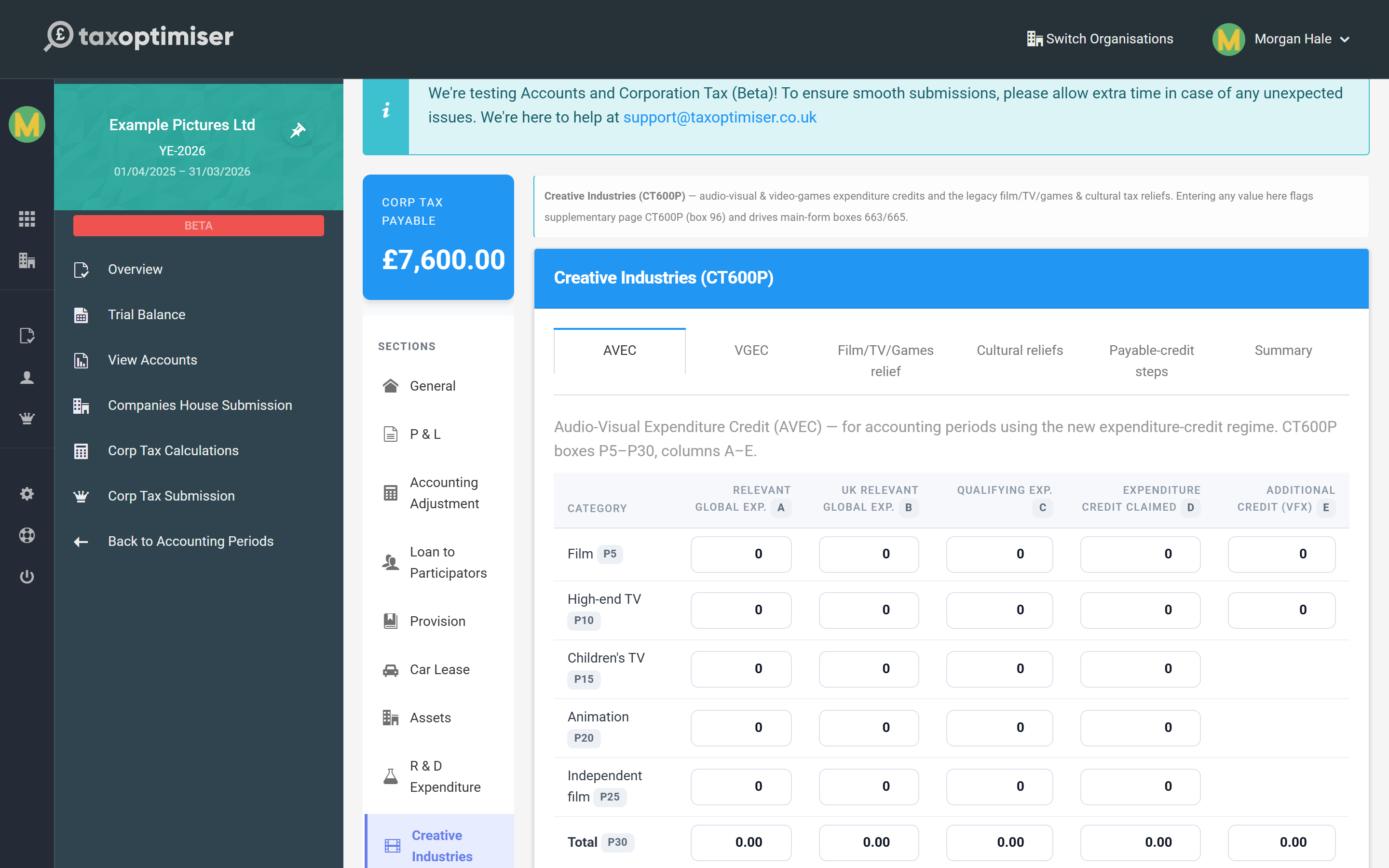
The section has six tabs, one per part of the form. The small grey chips next to each row (P5, P30, P115…) tell you which CT600P box that row fills, and the column chips (A to E) which column of it.
| Tab | What goes in it | Boxes |
|---|---|---|
| AVEC | One row per type of audio-visual production: expenditure and the credit claimed. | P5–P30 |
| VGEC | The same for video games. | P35, P45 |
| Film/TV/Games relief | Productions still claiming under the legacy reliefs. | P260–P285 |
| Cultural reliefs | Theatre, orchestra and museum/gallery exhibition claims. | P290–P305 |
| Payable-credit steps | The AVEC/VGEC steps, carry-forward, surrender and discharge totals. | P50–P245 |
| Summary | Totals of the additional-deduction reliefs and the set-off of their payable credit. | P310–P330 |
For an AVEC claim you type one row: the relevant global expenditure (A), the UK part of it (B), the qualifying expenditure (C) and the credit claimed (D), plus the visual-effects credit (E) where it applies. The Total row is worked out for you — HMRC requires it to equal the rows above to the penny, and a typed total that is a few pence out is a rejected return.
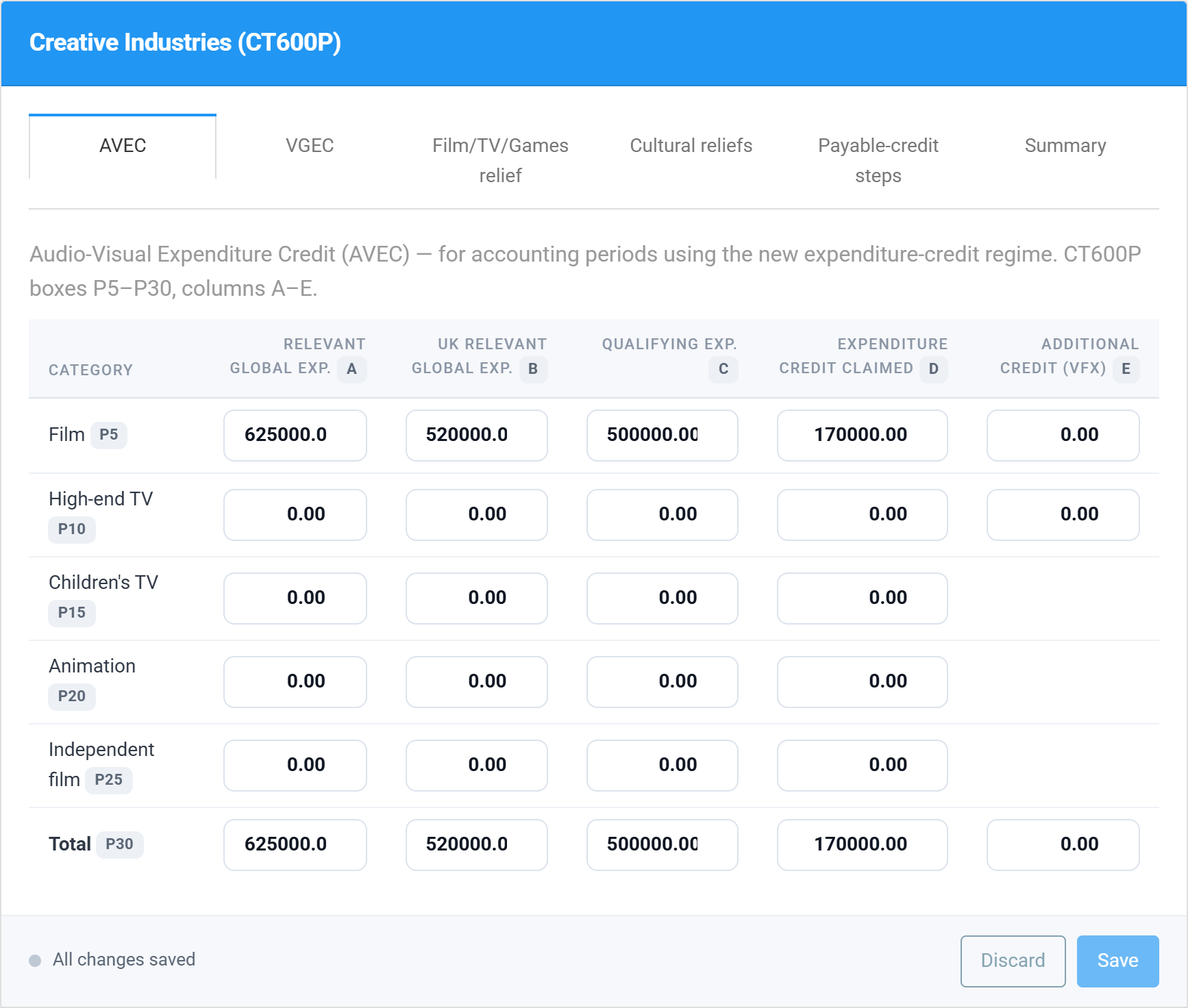
Then Save. The payable-credit steps fill themselves in from the credit and the company’s Corporation Tax.
The payable-credit steps, one at a time
The Payable-credit steps tab follows the form’s own order. Almost every box is an arithmetic rule HMRC checks exactly, so Tax Optimiser calculates it; the boxes you can type in are the ones that record a choice.
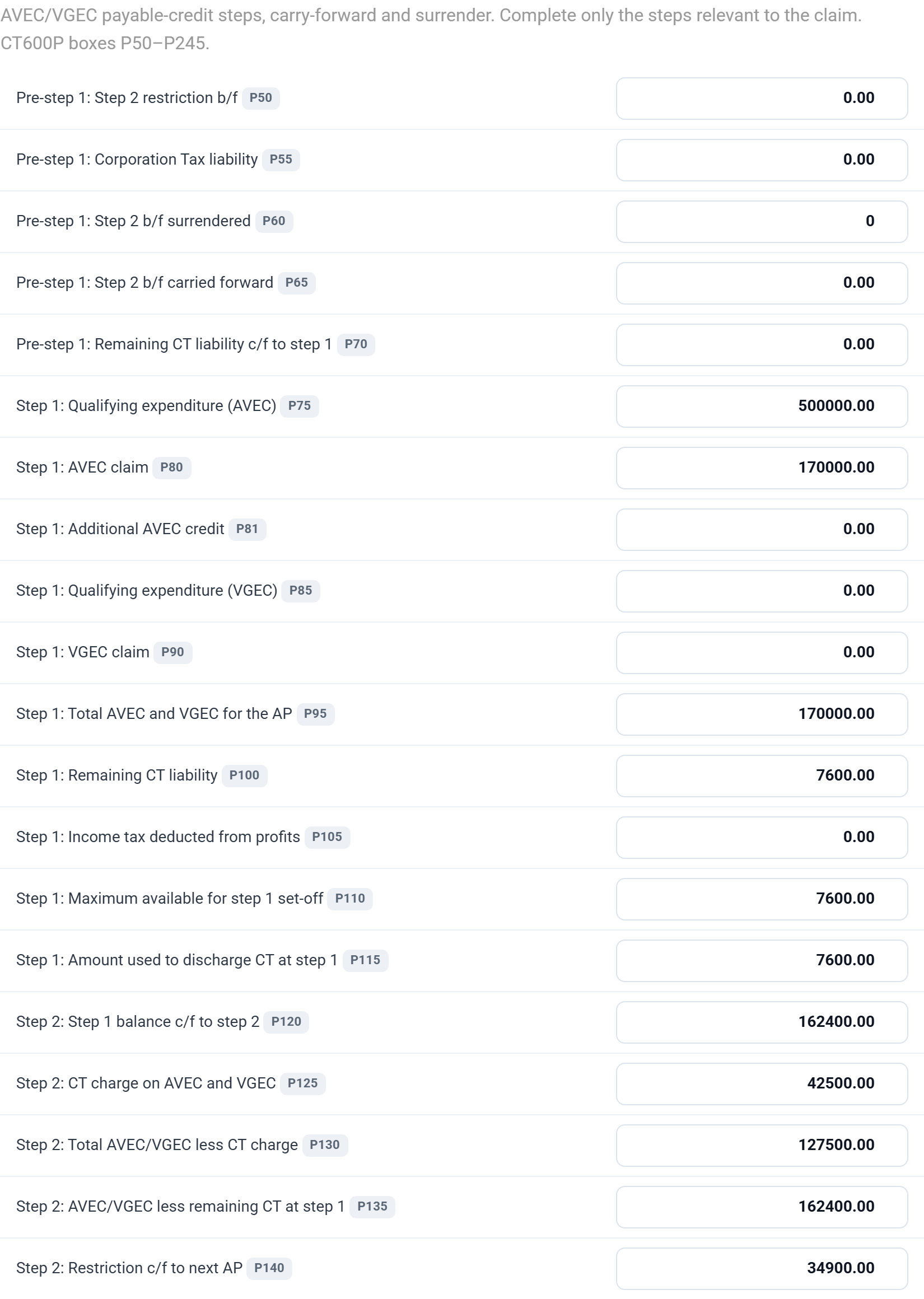
- Pre-step 1 (P50–P70) — only if a Step 2 restriction was carried forward from an earlier period. Enter it in P50 and how much of it you want to use against this period’s tax in P60; Tax Optimiser caps P60 at the amount brought forward and the tax available, and works out the rest.
- Step 1 (P75–P115) — the credit for the period (P95) is set against the Corporation Tax left after any R&D credit (P100). Enter income tax deducted from profits in P105 if there is any; P115 is the amount used.
- Step 2 (P120–P140) — the notional tax charge at 25% (P125) and the restriction carried forward (P140).
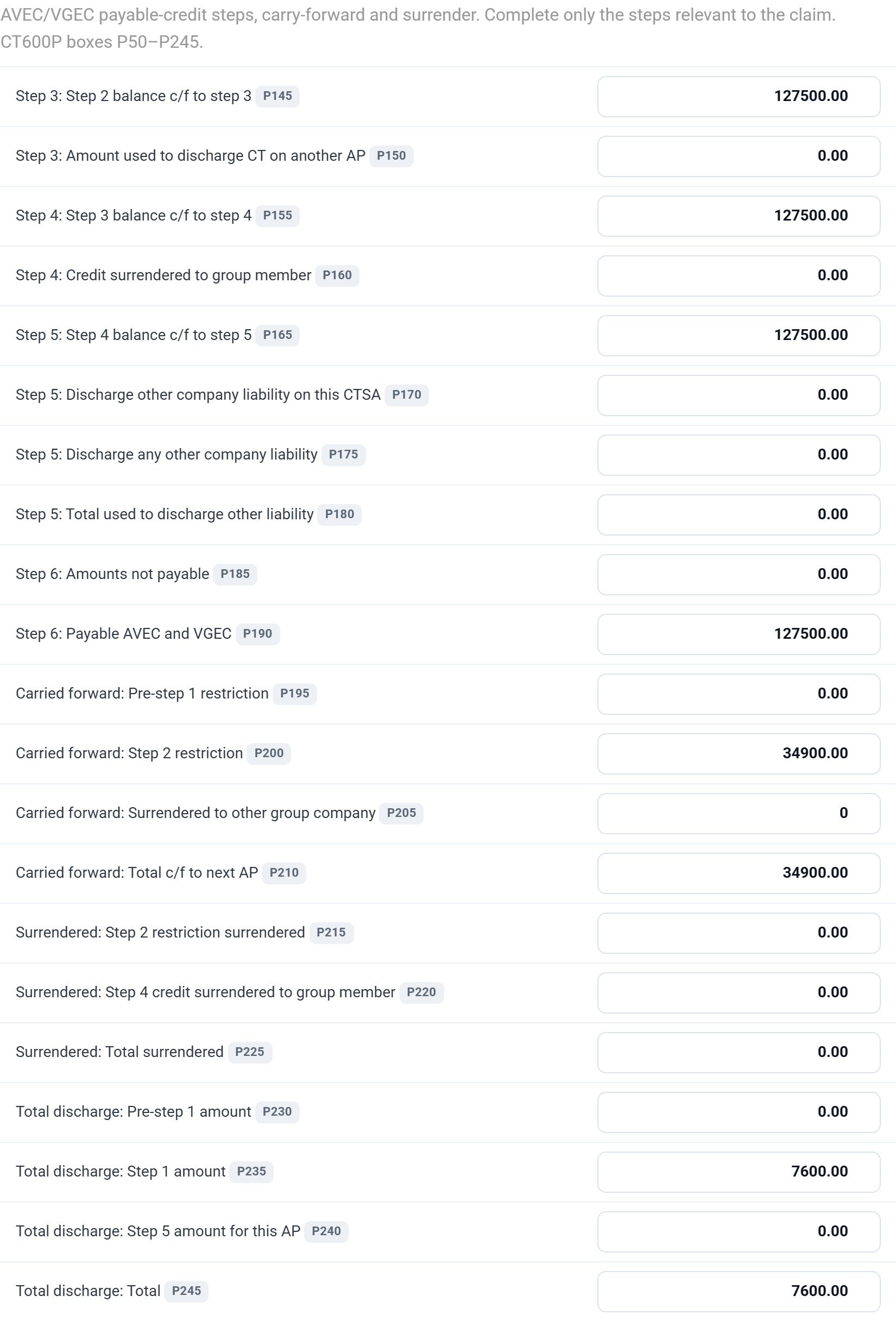
- Step 3 (P145–P150) — any amount you want to use against the Corporation Tax of another accounting period goes in P150.
- Step 4 (P155–P160) — credit surrendered to a group company (P160).
- Step 5 (P165–P180) — credit used to pay other liabilities of the company: on this return (P170) or elsewhere (P175).
- Step 6 (P185–P190) — amounts HMRC is withholding under section 1179CG CTA 2009, if they have told you so (P185), and the payable credit (P190).
- Carried forward, surrendered and discharged (P195–P245) — summaries of the above, all calculated.
Every choice is capped at what is available at that step, so the chain can never go negative. If you type a figure that is too big, it is reduced to the most the step allows when you save.
What it does to the return
The CT600P feeds these boxes of the main return, and Tax Optimiser fills them all:
- Box 96 — CT600P attached.
- Box 541 — AVEC and VGEC used against this return’s tax (P245), which flows into box 545 and reduces the tax outstanding.
- Box 886 — the payable AVEC and VGEC (P190). HMRC pays this to the company, so add the bank details on the Repayments section (see CT600 repayments).
- Box 540 and box 885 — for the additional-deduction reliefs, the payable tax credit set against this return (P325) and the balance paid out (P330).
- Box 663 and box 665 — the core expenditure and additional deduction of those reliefs (P310 and P315), filled from the CT600P in the return sent to HMRC. Box 658, the additional creatives information form, is ticked on the R & D Expenditure section.
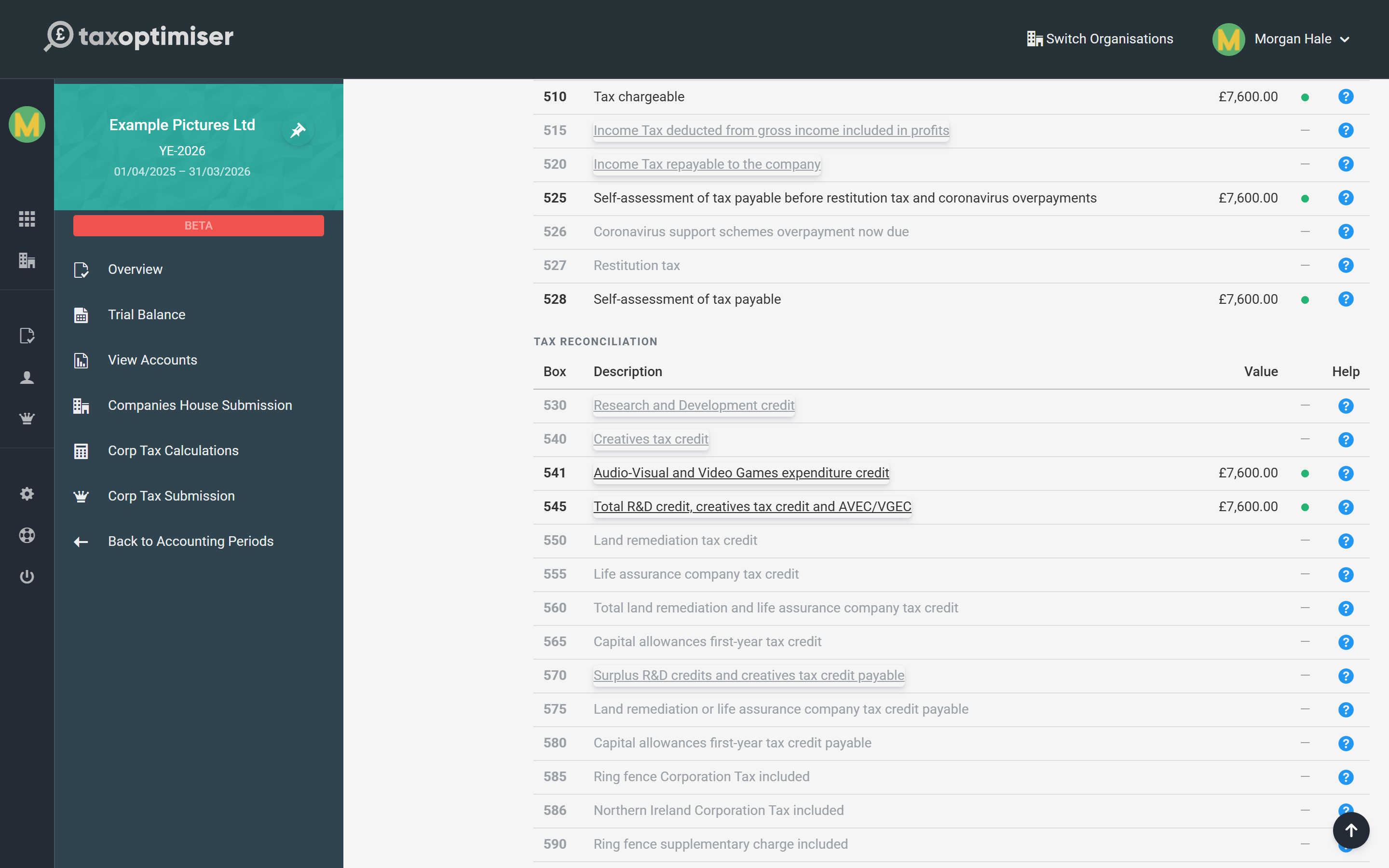
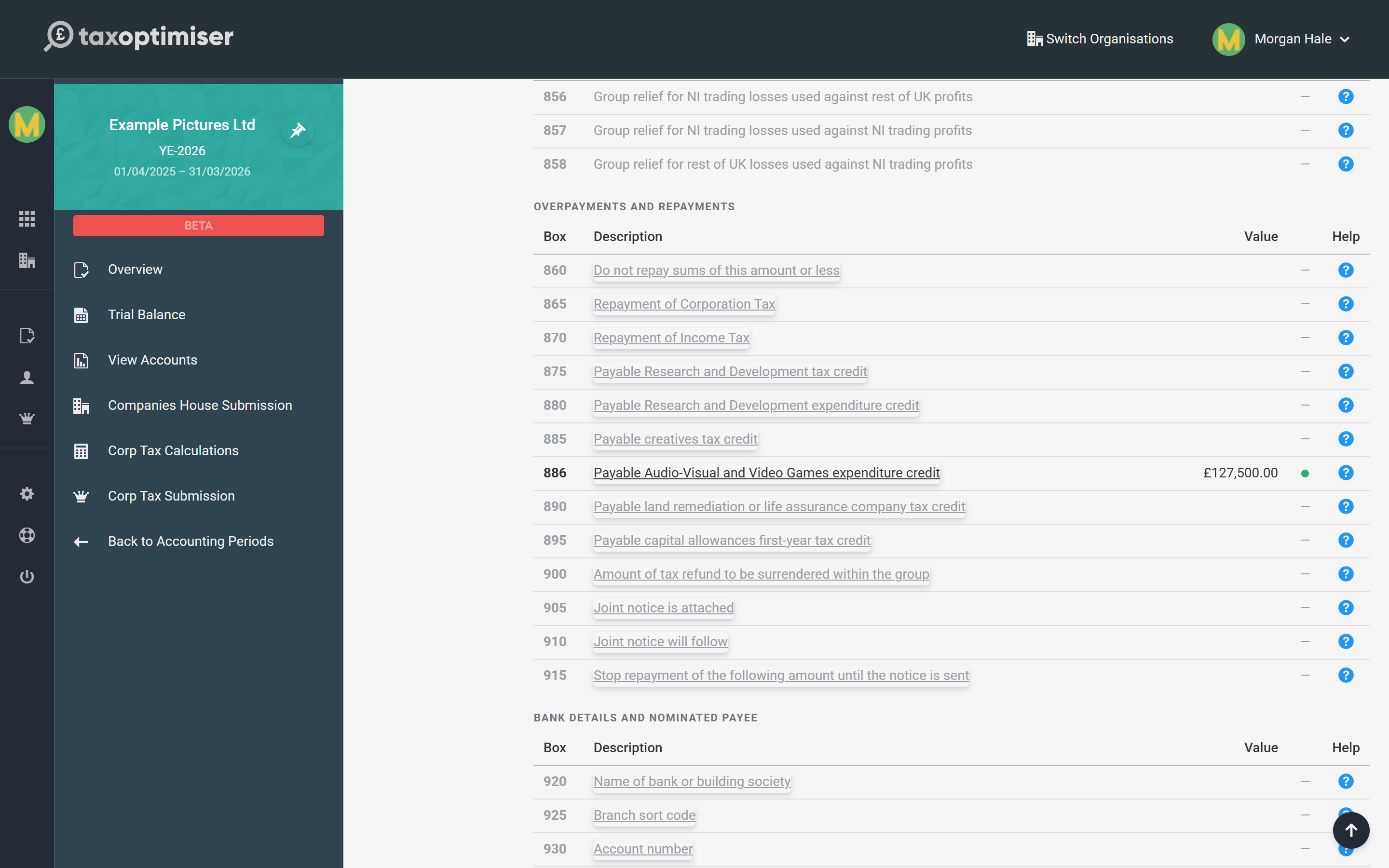
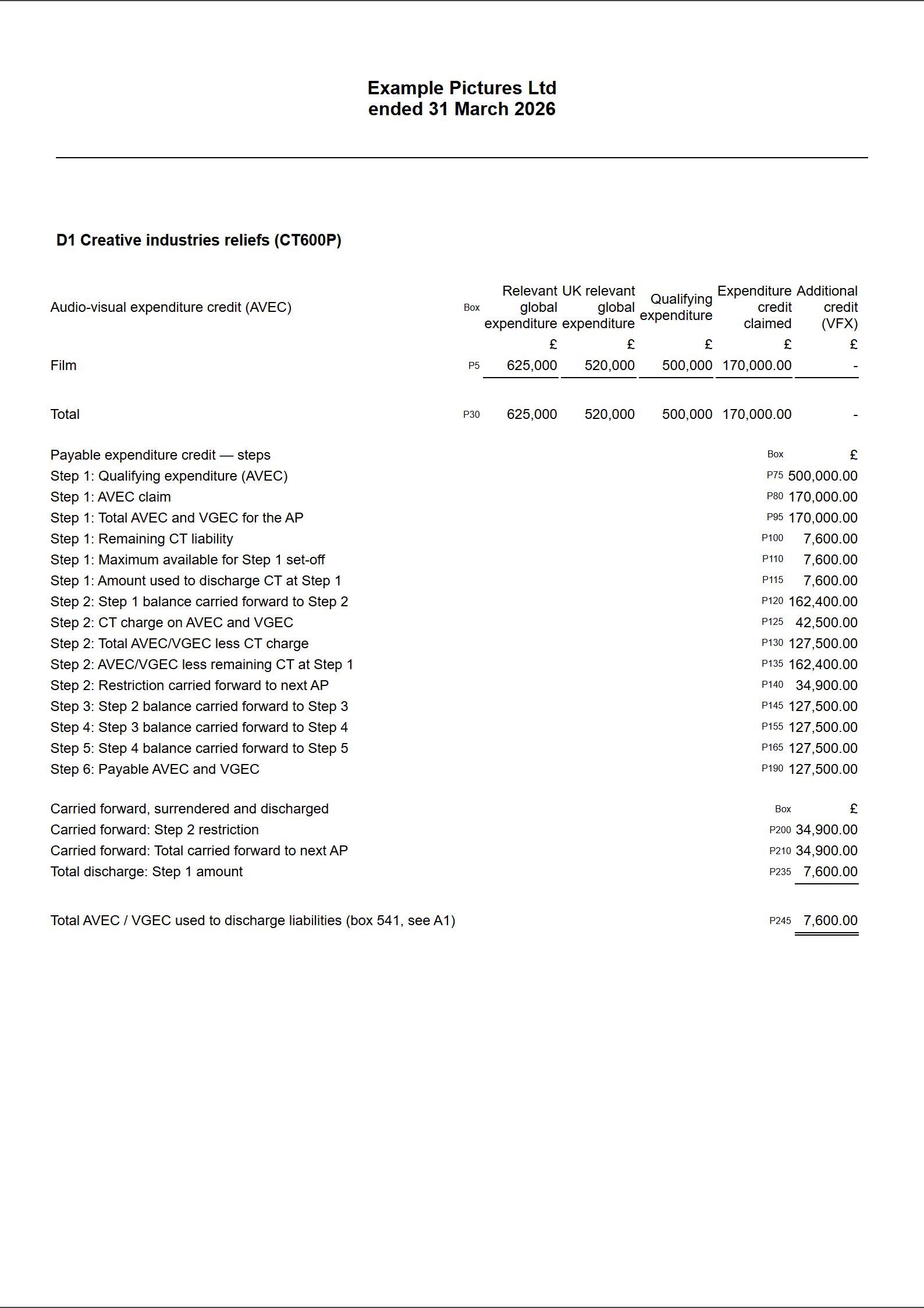
The computation prints a Creative industries reliefs (CT600P) page with the expenditure, every step of the chain and the carried-forward restriction — the page to give a client or reviewer.
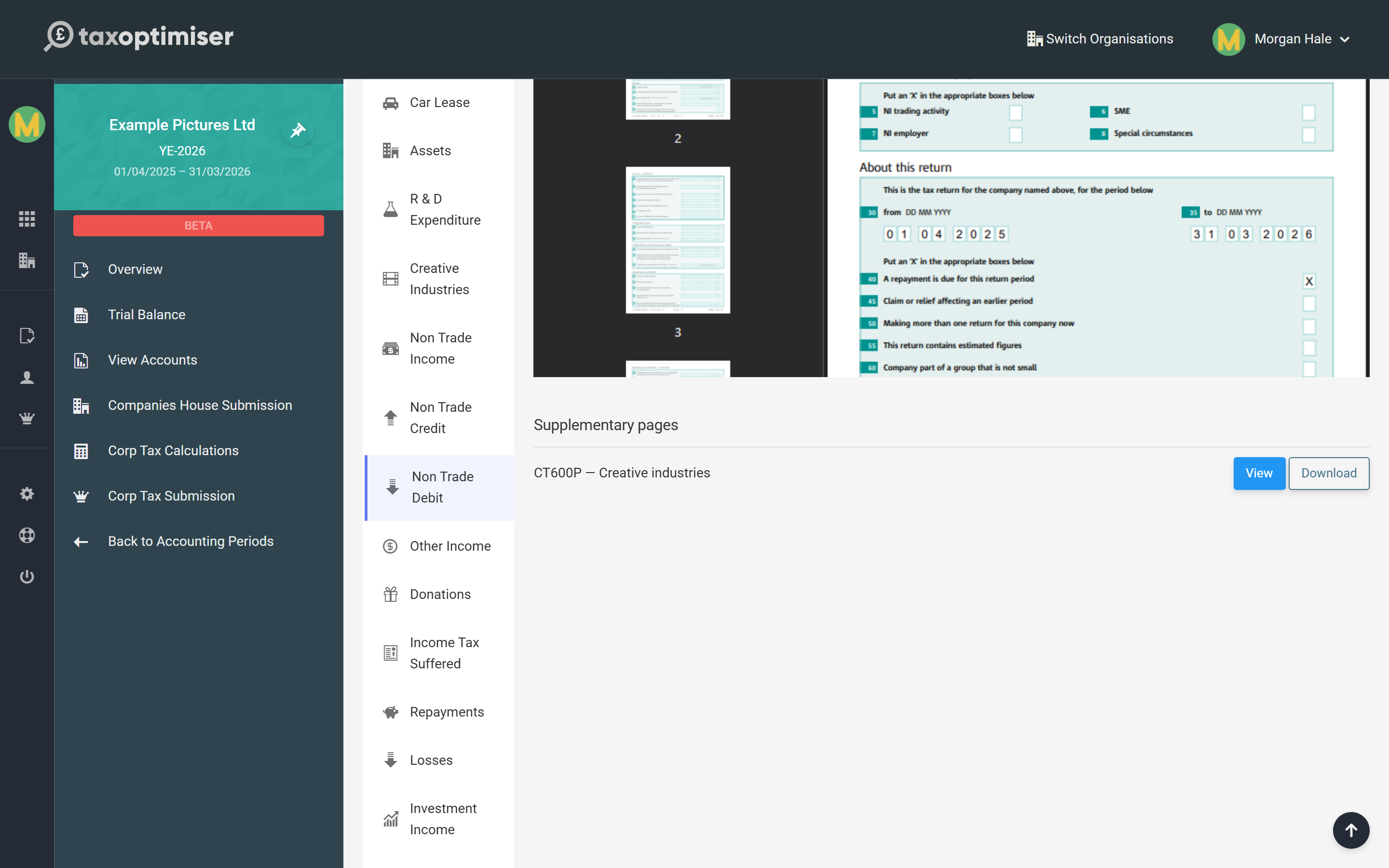
And the CT600P itself is generated with the return. Open it from the Supplementary pages list on the CT600 Document to check the completed form before you file.
The additional deduction is not taken off profit for you. For the cultural and legacy reliefs, Tax Optimiser reports the additional deduction in P315 and box 665 but does not deduct it in the computation. Put it in as an adjustment under Accounting Adjustment so the taxable profit is right.
A worked example
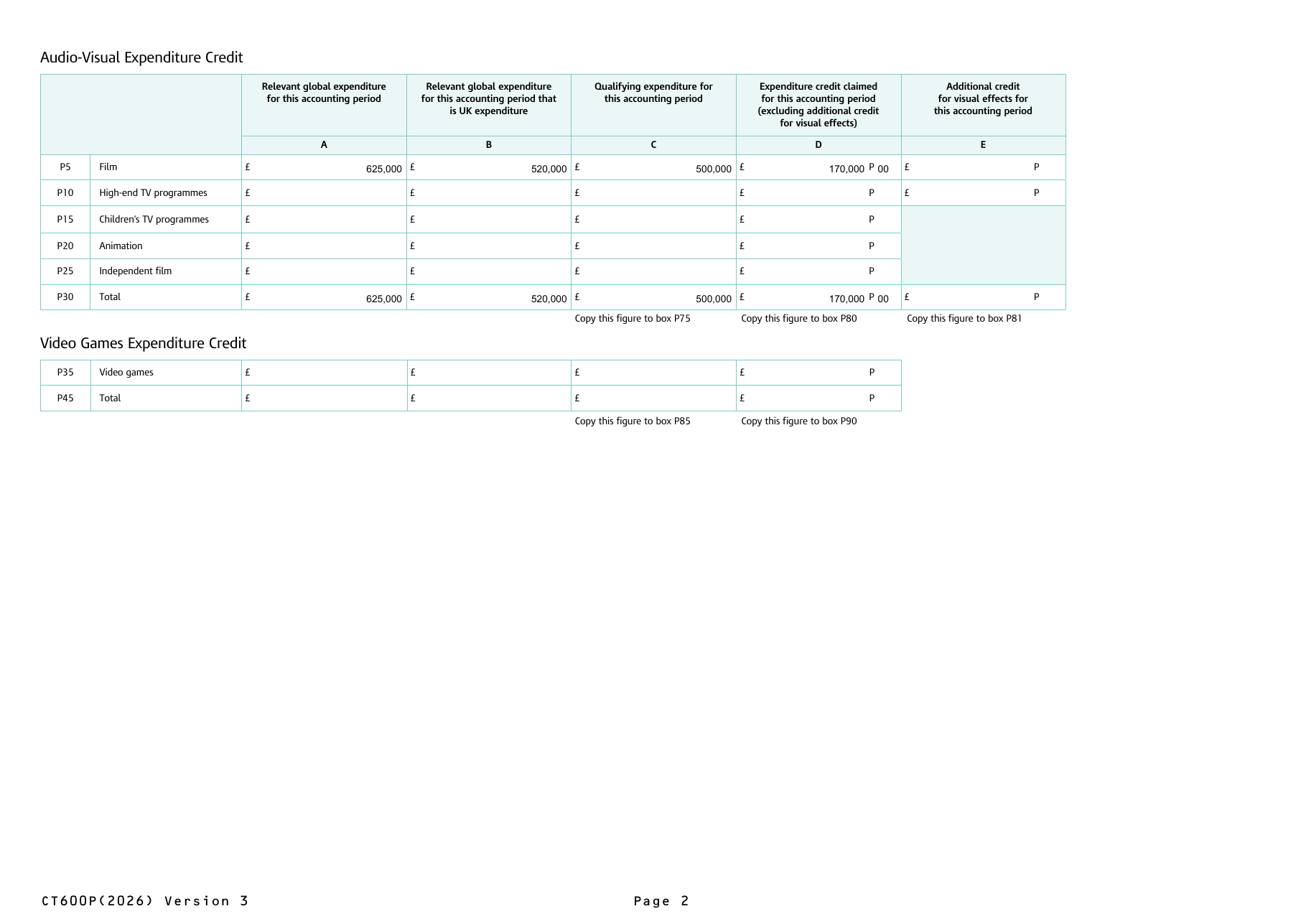
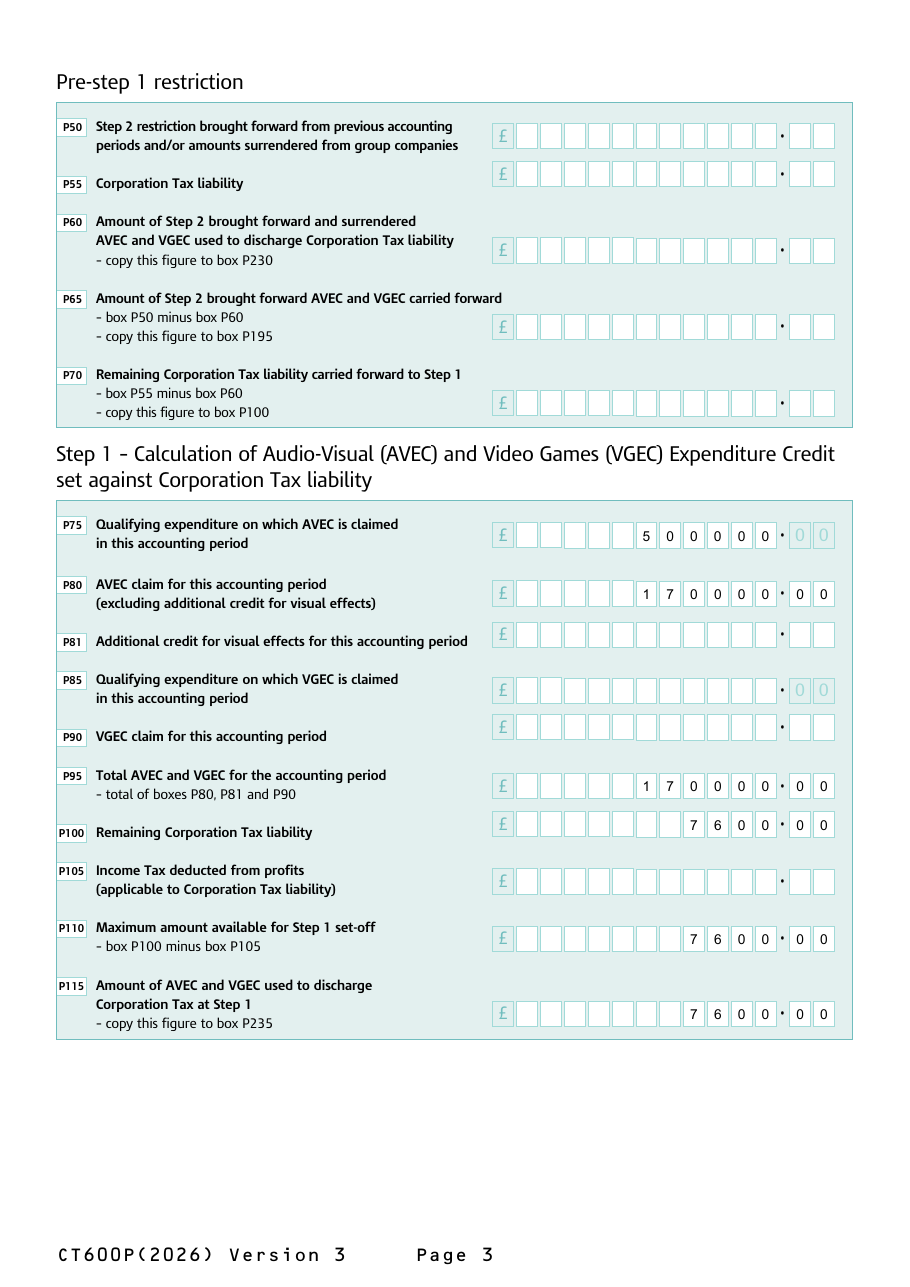
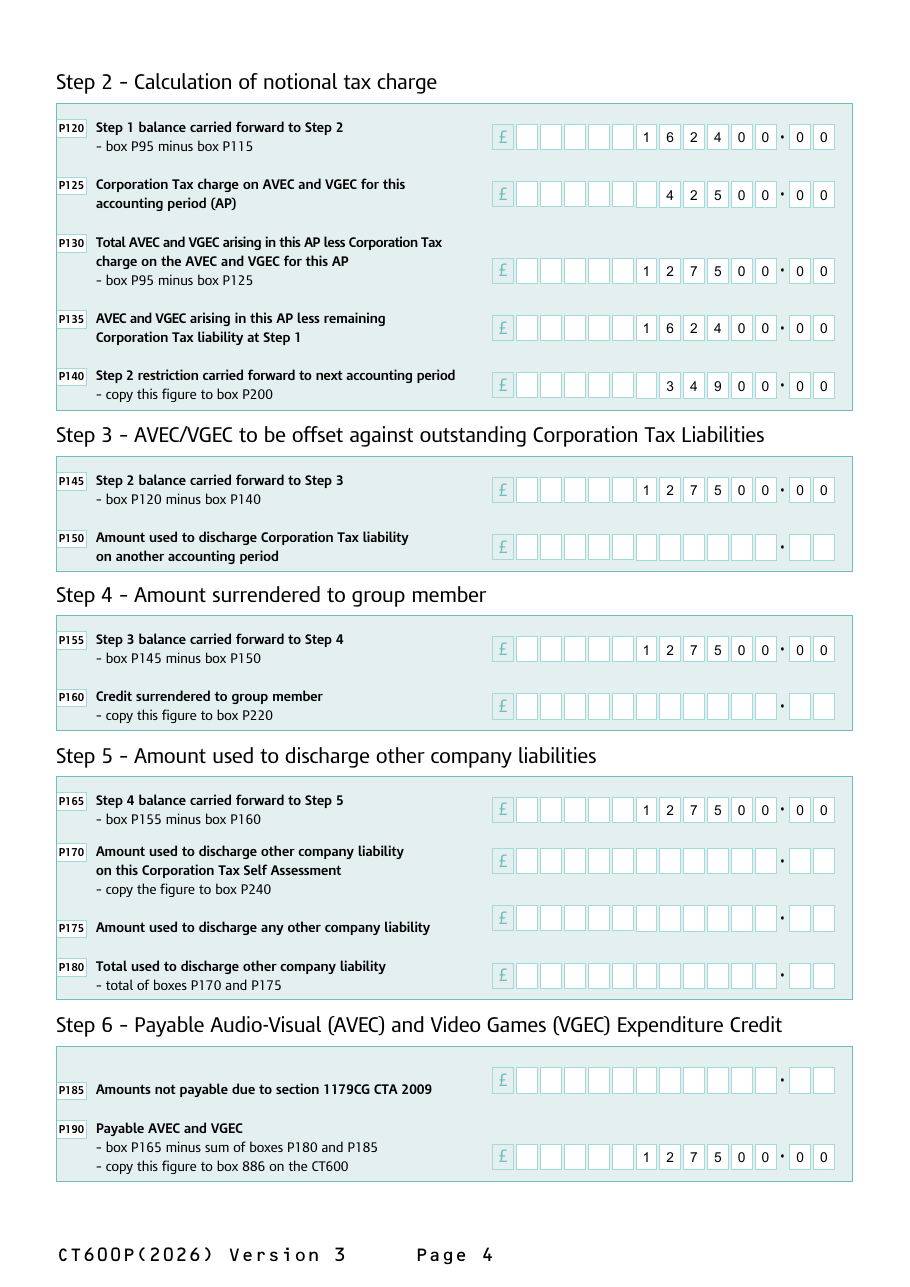
The screenshots come from a demonstration company, Example Pictures Ltd, with a 31 March 2026 year end and one film claiming AVEC at the 34% film rate:
| Figure | Box | Amount |
|---|---|---|
| Core expenditure on the film | P5A | £625,000 |
| UK expenditure | P5B | £520,000 |
| Qualifying expenditure — the lower of UK expenditure and 80% of core (£500,000) | P5C | £500,000 |
| AVEC claimed at 34% | P5D | £170,000 |
| Taxable profit, credit included → Corporation Tax at 19% | 475 | £7,600 |
| Step 1: credit used against that tax | P115 | £7,600 |
| Step 2: notional tax, 25% of £170,000 | P125 | £42,500 |
| Step 2: restriction carried forward (£162,400 left after Step 1, less £127,500 net of notional tax) | P140 | £34,900 |
| Step 6: payable in cash | P190 / 886 | £127,500 |
The company pays no Corporation Tax (box 541 cancels the £7,600), HMRC pays it £127,500, and £34,900 of restricted credit waits in P200 to pay next year’s tax through Pre-step 1. Across the two years the company gets the full £170,000, less the notional tax HMRC keeps.
What Tax Optimiser checks before you file
HMRC runs more than a hundred arithmetic and cross-reference rules on the CT600P, and a rejection costs a day. Tax Optimiser handles them for you:
- Totals are calculated, never typed. The P30, P45, P285 and P305 total rows, the Step 1 links (P75–P90) and the P310–P330 summary always equal the rows they add up.
- The step chain is derived. P55 and P100 come from box 475 less any R&D credit in box 530; P125 uses the main rate for the period end (25% from 1 April 2023, 19% before); every balance is the one before less what was used.
- Your choices are capped. P60, P105, P150, P160, P170, P175, P185 and P205 can never exceed what is available at their step.
- Linked boxes travel together. HMRC requires many boxes to appear in pairs (P60 with P230, P115 with P235, P170 with P240, box 541 with P245, box 540 with P325, box 886 with P190). They are always sent as a set, even at nil.
- The credit cannot create a repayment on its own. The amount used against this return (box 541) is capped at the tax actually due; anything more is paid through box 886.
One thing is not supported: surrendering AVEC or VGEC to another group company (P160 or P205). HMRC then needs the Details of AVEC and VGEC surrendered table (P250–P255), which Tax Optimiser does not yet complete, so a return with a group surrender will be rejected. Contact support if you need it.
CT600P box by box
Box numbering follows the CT600P (2026) Version 3 form, for accounting periods starting on or after 1 April 2015. Boxes on the main CT600 are covered in the CT600 box-by-box guide.
Boxes P1 to P4 — Company information
Company name (P1), the 10-digit Unique Taxpayer Reference (P2), and the start and end of the return period (P3, P4), which cannot exceed 12 months. All four are copied from the return.
Boxes P5 to P25 — Audio-Visual Expenditure Credit
One row per type of production: P5 film, P10 high-end TV programmes, P15 children’s TV programmes, P20 animation and P25 independent film. Each has the same columns:
- A — Relevant global expenditure for this accounting period: the core production spend wherever it was incurred.
- B — Relevant global expenditure that is UK expenditure.
- C — Qualifying expenditure: the lower of column B and 80% of column A (visual-effects costs are outside the cap).
- D — Expenditure credit claimed, excluding the visual-effects credit: column C at 34%, 39% or 53%.
- E — Additional credit for visual effects: film and high-end TV only.
Box P30 — AVEC total
The five rows added up, column by column. P30C is copied to P75, P30D to P80 and P30E to P81.
Boxes P35 and P45 — Video Games Expenditure Credit
P35 is the video games row, with columns A to D as for AVEC (there is no visual-effects column), and P45 its total. P45C is copied to P85 and P45D to P90.
Box P50 — Step 2 restriction brought forward
Pre-step 1 starts here: restricted credit carried forward from earlier periods (their P210), plus any surrendered to this company by a group company. Leave it at nil if there is none and the whole Pre-step 1 section is left off the return.
Box P55 — Corporation Tax liability
The company’s Corporation Tax for the period (box 475) less any R&D expenditure credit set against it (box 530). Calculated.
Box P60 — Step 2 brought forward and surrendered AVEC and VGEC used to discharge Corporation Tax
How much of P50 you use against this period’s tax. Your choice, capped at the lower of P50 and P55. Copied to P230.
Box P65 — Step 2 brought forward AVEC and VGEC carried forward
P50 minus P60, copied to P195.
Box P70 — Remaining Corporation Tax liability carried forward to Step 1
P55 minus P60, copied to P100.
Boxes P75 to P90 — Step 1 claim figures
Copies of the totals above: P75 AVEC qualifying expenditure (P30C), P80 AVEC claim (P30D), P81 visual-effects credit (P30E), P85 VGEC qualifying expenditure (P45C) and P90 VGEC claim (P45D).
Box P95 — Total AVEC and VGEC for the accounting period
P80 plus P81 plus P90: the whole credit arising this period.
Box P100 — Remaining Corporation Tax liability
P70 if there is a Pre-step 1 section; otherwise the Corporation Tax left after any R&D credit (box 475 minus box 530).
Box P105 — Income Tax deducted from profits
Income tax suffered on income included in profits, to the extent it goes against the Corporation Tax liability. Entered by you; capped at P100.
Box P110 — Maximum amount available for Step 1 set-off
P100 minus P105.
Box P115 — AVEC and VGEC used to discharge Corporation Tax at Step 1
The lower of P95 and P110. Copied to P235.
Box P120 — Step 1 balance carried forward to Step 2
P95 minus P115: the credit left after paying this period’s tax.
Box P125 — Corporation Tax charge on AVEC and VGEC
The notional tax on the credit: P95 at the main rate of Corporation Tax for the period (25% for periods ending on or after 1 April 2023). It is a notional figure — the company does not pay it, it just limits what can be paid out.
Box P130 — Total AVEC and VGEC less the Corporation Tax charge
P95 minus P125: the most that can be paid out or used after Step 1 this period.
Box P135 — AVEC and VGEC less remaining Corporation Tax liability at Step 1
P95 minus P110 where the credit is larger than the tax, otherwise nil.
Box P140 — Step 2 restriction carried forward to next accounting period
P135 minus P130 where P135 is larger, otherwise nil. This is the credit held back this period; it is copied to P200 and comes back next period through Pre-step 1.
Box P145 — Step 2 balance carried forward to Step 3
P120 minus P140.
Box P150 — Amount used to discharge Corporation Tax of another accounting period
Your choice: credit used to pay the company’s Corporation Tax for a different period. Capped at P145.
Box P155 — Step 3 balance carried forward to Step 4
P145 minus P150.
Box P160 — Credit surrendered to group member
Credit surrendered to another group company. Copied to P220. See the note above: a group surrender also needs the P250 details table, which Tax Optimiser does not yet complete.
Box P165 — Step 4 balance carried forward to Step 5
P155 minus P160.
Box P170 — Amount used to discharge other company liability on this return
Credit used to pay another liability of the company shown on this Company Tax Return (for example a section 455 charge in box 480). Copied to P240.
Box P175 — Amount used to discharge any other company liability
Credit used to pay any other liability the company owes HMRC, such as PAYE or VAT.
Box P180 — Total used to discharge other company liability
P170 plus P175.
Box P185 — Amounts not payable
Credit HMRC is not paying out under section 1179CG CTA 2009 — for example while an enquiry is open or PAYE and NIC are outstanding. Only enter it if HMRC has told you.
Box P190 — Payable AVEC and VGEC
P165 minus P180 and P185: the credit HMRC pays in cash. Copied to box 886 on the CT600.
Boxes P195 to P210 — AVEC and VGEC carried forward
P195 Pre-step 1 restriction (equals P65), P200 Step 2 restriction (equals P140), P205 the part of those surrendered to another group company (your choice, capped at P195 plus P200) and P210 the total carried forward to the next accounting period: P195 plus P200 minus P205. Next year’s P50 starts from this figure.
Boxes P215 to P225 — AVEC and VGEC surrendered
P215 Step 2 restriction surrendered (equals P205), P220 Step 4 credit surrendered to a group member (equals P160) and P225 the total of the two.
Boxes P230 to P245 — Total credits to discharge against liabilities in this return
P230 pre-step 1 discharge amount (equals P60), P235 Step 1 discharge amount (equals P115), P240 Step 5 discharge amount for this accounting period (equals P170) and P245 their total, copied to box 541 on the CT600.
Boxes P250 and P255 — Details of AVEC and VGEC surrendered
Required when you surrender credit with P160 or P205: the name, tax reference, accounting period and amount for each company receiving it (P250A to P250D), and the total (P255). Not yet completed by Tax Optimiser.
Boxes P260 to P285 — Film, high-end TV, children’s TV, animation and video games tax relief
The legacy additional-deduction reliefs, one row each: P260 film, P265 high-end TV, P270 children’s TV, P275 animation, P280 video games, and P285 the total. The columns:
- A — Total core expenditure for this accounting period.
- B — UK core expenditure for this accounting period.
- C — Additional deduction for this accounting period.
- D — Losses surrendered for tax credit.
- E — Tax credit claimed for this accounting period.
New productions cannot use these reliefs after 31 March 2025, and they close to all productions on 1 April 2027.
Boxes P290 to P305 — Cultural reliefs
P290 theatre, P295 orchestra, P300 museum/gallery exhibition and P305 the total, with the same columns A to E as the legacy reliefs.
Box P310 — Total core expenditure for this accounting period
P285A plus P305A. Copied to box 663 on the CT600.
Box P315 — Total additional deduction for this accounting period
P285C plus P305C. Copied to box 665 on the CT600. Remember to deduct it in the computation as well.
Box P320 — Total tax credit claim for this accounting period
P285E plus P305E.
Box P325 — Payable tax credit set-off against other liabilities on this return
Your choice: how much of the tax credit to set against tax on this return. Copied to box 540.
Box P330 — Balance payable tax credit
P320 minus P325, paid in cash. Copied to box 885 on the CT600.
Main return: boxes 96, 540, 541, 545, 663, 665, 885 and 886
The CT600 boxes driven by the CT600P: box 96 (CT600P attached), box 540 (equal to P325), box 541 (equal to P245), box 545 (the total of boxes 530, 540 and 541), box 663 (equal to P310), box 665 (equal to P315), box 885 (equal to P330) and box 886 (equal to P190). Tax Optimiser sets all of them from the CT600P.
Common questions
What is the AVEC rate?
34% of qualifying expenditure for film and high-end TV, 39% for animation and children’s TV, and 53% for independent films with a core budget under £23.5 million. UK visual-effects costs on film and high-end TV get an extra 5%. Qualifying expenditure is the lower of the UK expenditure and 80% of core expenditure.
Is the Audio-Visual Expenditure Credit taxable?
Yes. AVEC and VGEC are above-the-line credits: the credit is included in the company’s profit as income and taxed, which is why the headline 34% rate is worth about 25.5% after tax at the 25% main rate.
Why is my payable AVEC less than the credit I claimed?
Two reasons. The credit first pays the company’s own Corporation Tax at Step 1, and at Step 2 a notional tax charge at 25% of the credit is taken off, so anything above the credit net of that charge is restricted and carried forward rather than paid now. What is left after Steps 3 to 5 is paid in cash through box 886.
What is the Step 2 restriction on the CT600P?
It is the part of the credit that cannot be paid out this period because it would exceed the credit net of notional tax. It is reported in box P140, carried forward in P200 and P210, and used in a later period through Pre-step 1 (boxes P50 to P70), where it can pay that period’s Corporation Tax.
Where does the payable AVEC go on the CT600?
Box P190 on the CT600P is copied to box 886 on the CT600. The part of the credit used against this return’s own tax (P245) goes in box 541, and box 96 is ticked to show the CT600P is attached.
What is the difference between VGEC and Video Games Tax Relief?
Video Games Expenditure Credit is the above-the-line credit at 34% that replaced Video Games Tax Relief from 1 January 2024. Video Games Tax Relief was an additional deduction with a payable tax credit for losses. Games that began development before 1 April 2025 can stay in the old relief until it closes on 1 April 2027; new games must claim VGEC.
What is the rate of theatre tax relief?
From 1 April 2025, 40% for non-touring productions and 45% for touring productions. Orchestra tax relief is 45%, and museum and gallery exhibition tax relief follows the theatre rates. These are additional-deduction reliefs, entered on the Cultural reliefs rows P290 to P305.
Can a company surrender AVEC to another group company?
The rules allow it, through box P160 or P205, but the return must then list each receiving company in boxes P250 and P255. Tax Optimiser does not complete that table yet, so a return with a group surrender will be rejected by HMRC — contact support if you need to make one.
Where to go next
- The Corporation Tax computation — where the credit shows as income and the tax is worked out.
- Submitting the Company Tax Return — filing the CT600 with its supplementary pages.
- CT600 box-by-box guide — every box on the main return.
- CT600L and R&D expenditure credit — the same above-the-line mechanics for R&D, which is set against tax before AVEC.
- CT600 repayments — bank details and how HMRC pays a payable credit.
- HMRCHMRC guidance on the creative industries tax reliefs and the Creative Industries Expenditure Credit Manual.rsquo;s Creative Industries Expenditure Credit Manual, and the BFIHMRC guidance on the creative industries tax reliefs and the Creative Industries Expenditure Credit Manual.rsquo;s guide to the expenditure credits.