
Most Company Tax Returns end with a bill. Some end with a refund: an R&D tax credit paid out in cash, Income Tax deducted at source that the company never owed, or Corporation Tax paid in advance that turned out to be too much. The CT600 has a whole section for this — boxes 860 to 970, plus box 40 on the first page — and filling it in properly is the difference between money arriving in the company’s bank account and a cheque turning up weeks later. This guide explains where repayments come from, why the “tax overpaid” box can be empty on a return that is plainly getting money back, how Tax Optimiser fills the repayment boxes for you, and what every box means.
Where a Corporation Tax repayment comes from
A company is owed money back through its return for one of five reasons:
- A payable R&D credit. By far the commonest. A loss-making R&D-intensive SME can surrender its loss for a cash credit under the enhanced R&D intensive support scheme (ERIS), and any company can have R&D expenditure credit (RDEC) left over once it has been set against its tax bills. Both are paid out through the repayment boxes.
- A payable creative or audio-visual credit. Film, television, video games, theatre, orchestra and museum reliefs, and the audio-visual and video games expenditure credits (AVEC and VGEC) that replaced them, can all produce a cash payment.
- Income Tax suffered at source. If Income Tax was deducted from income the company received — an annuity, some interest — it counts as tax already paid. Where it is more than the Corporation Tax due, the excess comes back.
- Tax paid in advance. A large company paying by quarterly instalments, or any company that paid before filing, may have paid more than the return shows is due.
- A loss carried back. A trading loss can be set against the previous year’s profits, repaying tax paid for that earlier year. This one works differently — see losses carried back below.
The first three are the ones Tax Optimiser works out from the figures you enter. The fourth depends on HMRC’s own payment records (see what Tax Optimiser does not fill in).
Box 605 and box 40: why a refund can show “nil overpaid”
This is the part of the CT600 that confuses almost everyone who files an R&D claim, so it is worth getting straight before looking at the boxes.
Box 605, “Tax overpaid”, is the bottom line of the tax reconciliation: credits set against the liability, plus tax already paid, minus the tax chargeable. It only counts credits that were set off against the company’s tax — the R&D credit in box 530, for example.
Box 40, “A repayment is due for this return period”, is the flag that tells HMRC money is going back to the company. It is ticked when box 605 has an amount or when a payable credit is claimed in its own right.
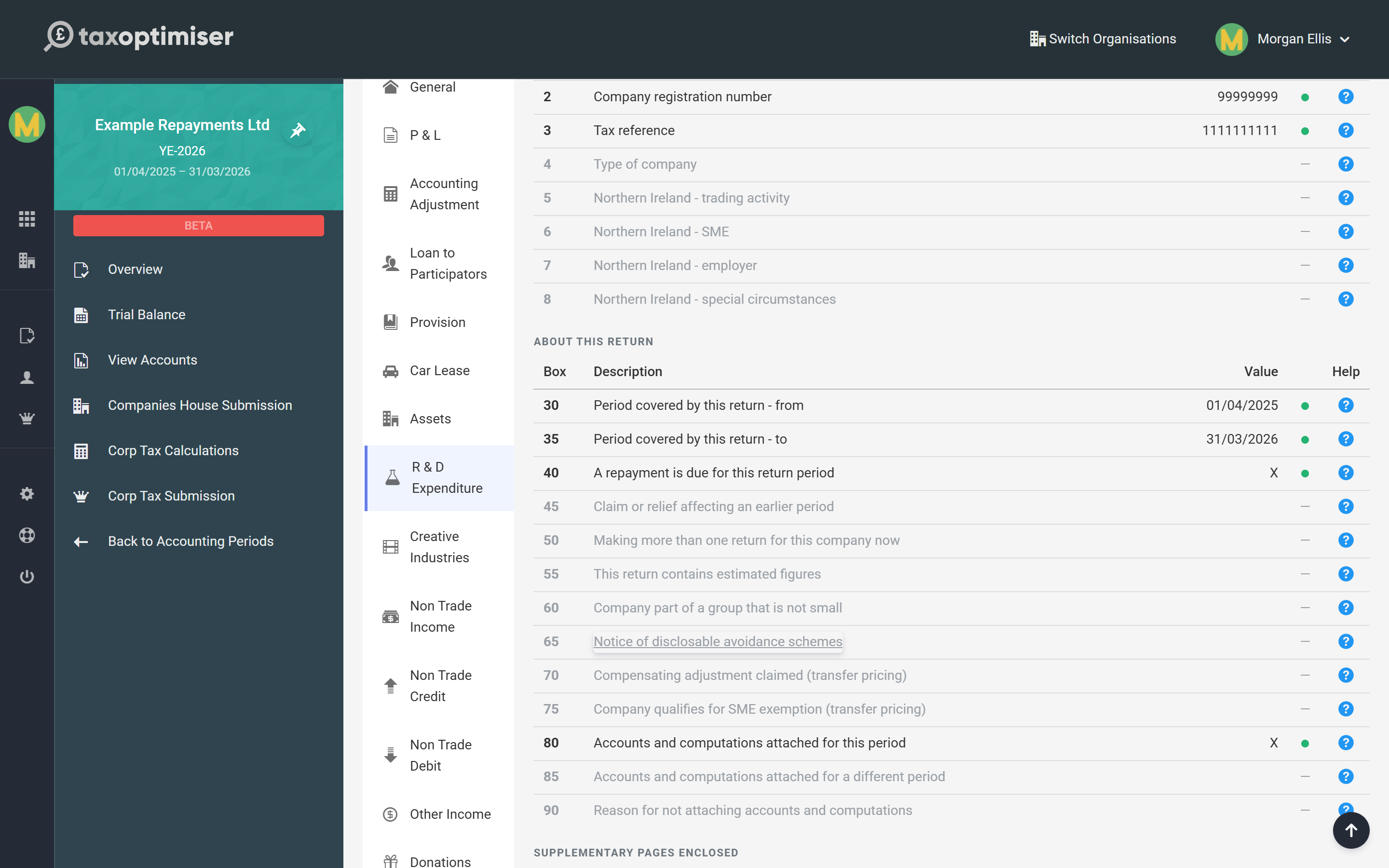
Those two things are not the same. A loss-making company making a pure ERIS cash claim has no tax to set anything against, so nothing reaches box 530 and box 605 is nil — yet the whole credit is being paid out, through box 875, and box 40 is ticked. That is correct. HMRC’s validation rules tie each payable-credit box to its supplementary page, not to box 605, and a return that tried to force the credit through box 605 would be rejected. Tax Optimiser ticks box 40 whenever box 605, 870, 875, 880, 885 or 886 has an amount.
Claim the credit on its supplementary page
A payable credit starts life on its own schedule and flows into the repayment boxes from there. You never type an amount into box 875 or box 880 directly — you complete the claim, and the repayment follows:
| Credit | Where you enter it | Repayment box |
|---|---|---|
| SME / ERIS payable R&D tax credit | R & D Expenditure → SME credit tab (CT600L boxes L166–L180) | 875 = L180 |
| Payable R&D expenditure credit (RDEC) | R & D Expenditure → Steps 1–7 (CT600L) | 880 = L125 |
| Payable creative industry credit | Creative Industries (CT600P) | 885 = P330 |
| Payable AVEC / VGEC | Creative Industries (CT600P) | 886 = P190 |
| Income Tax repayable | Income Tax Suffered and the Income Tax column of Non Trade Credit | 870 = 520 |
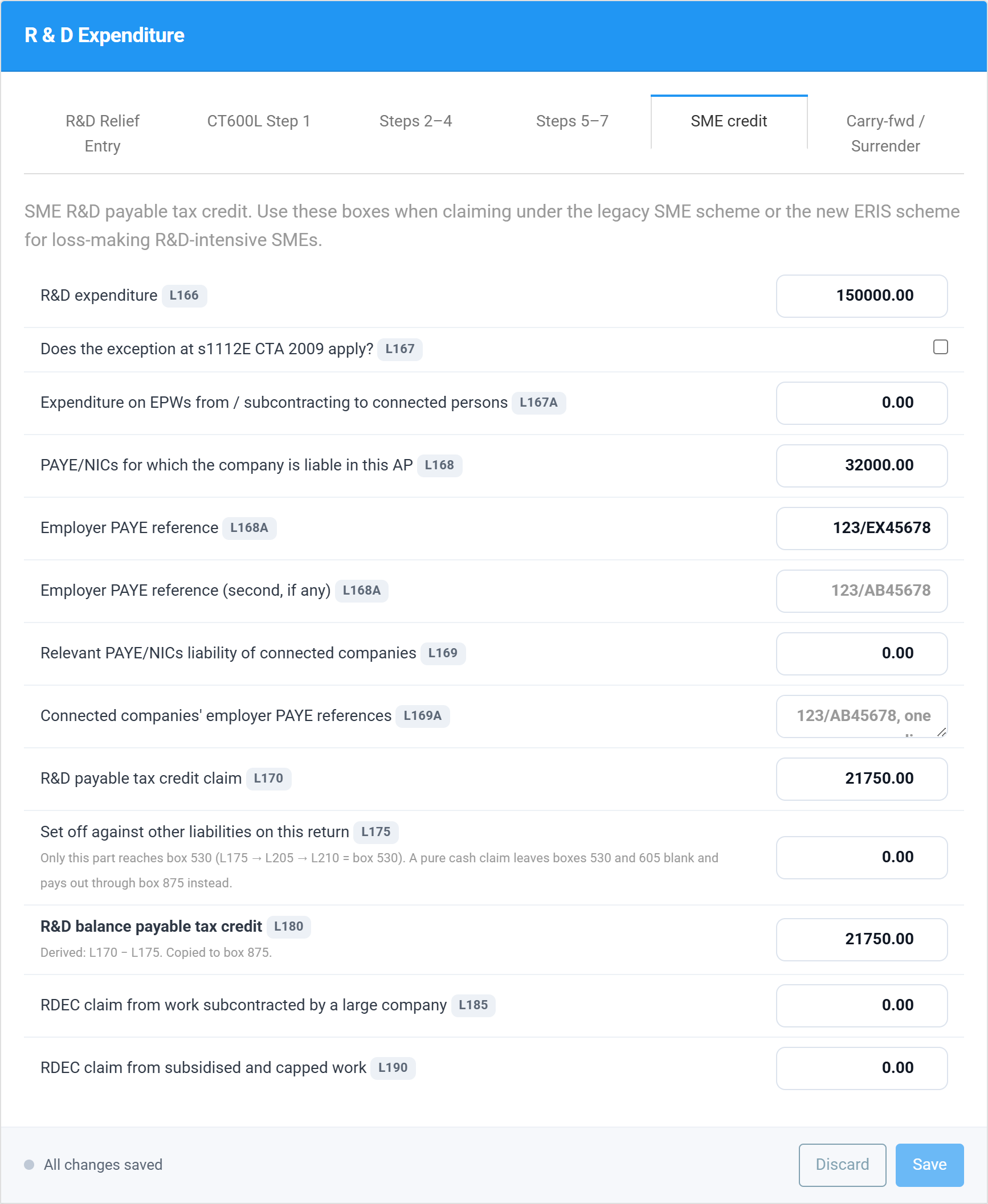
For an ERIS claim, open the accounting period’s Corp Tax workspace, choose R & D Expenditure and then the SME credit tab. Enter the R&D expenditure (L166), the PAYE and National Insurance figures that cap the credit (L168 and the employer PAYE reference in L168A) and the credit being claimed (L170). If part of the credit is being used to pay other tax on the same return, put that part in L175; whatever is left, L180, is paid in cash and copied to box 875. The CT600L R&D guide covers every one of those boxes.
Tell HMRC where to send the money
Choose Repayments in the left-hand menu of the Corp Tax workspace. The top of the section lists every repayment the return is claiming — each with its box number — and the bottom is where the company’s bank account goes.
If the return is claiming a repayment and there are no bank details, the section says so in orange: HMRC will fall back to sending a payable order, a cheque posted to the company, which is slower and easy to lose. The same warning appears on the Send Tax Return steps, so it cannot be missed at the point of filing.
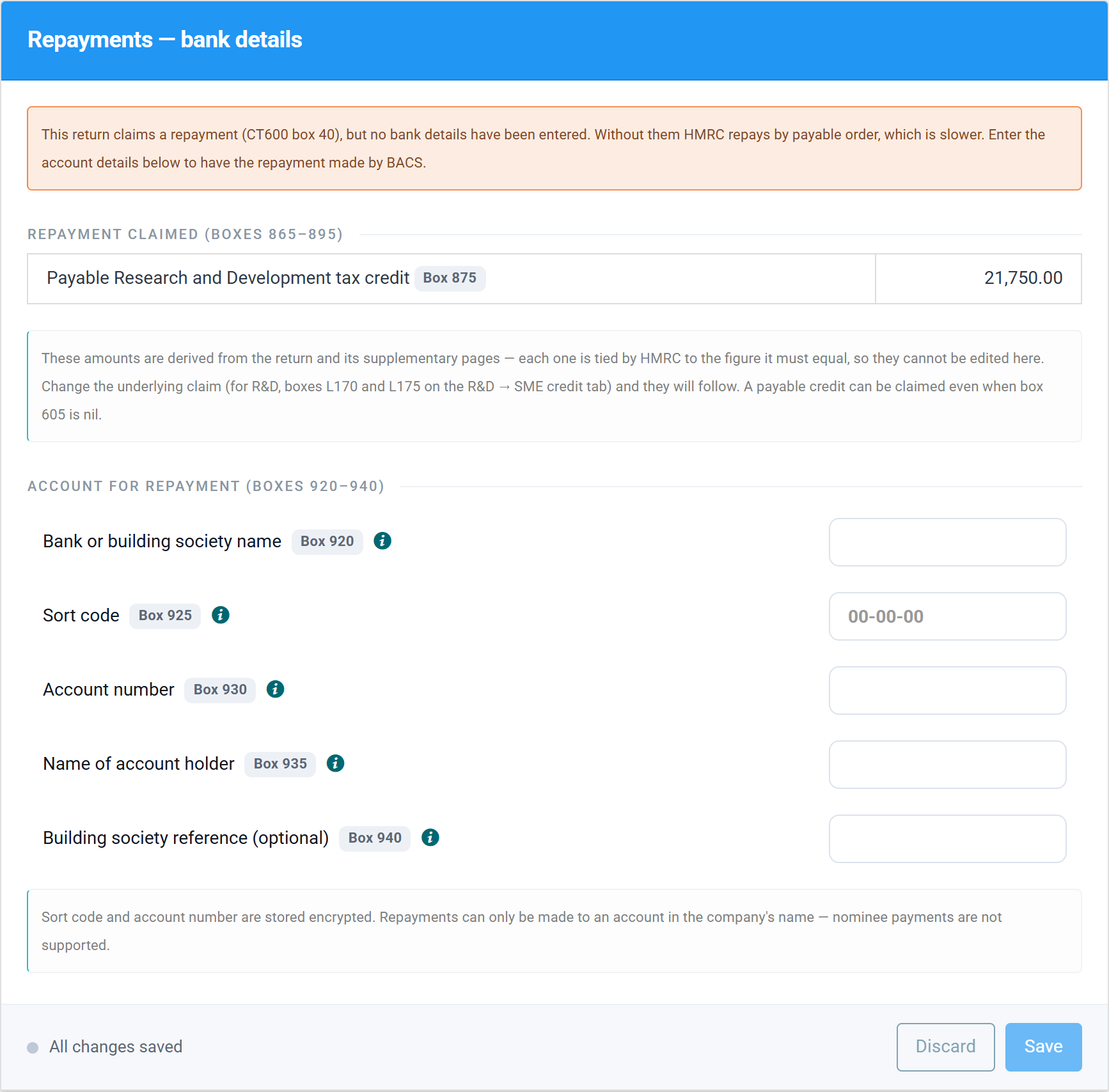
Fill in the four fields and Save:
| Field | What goes in it | Box |
|---|---|---|
| Bank or building society name | The name of the bank holding the account. | 920 |
| Sort code | Six digits. Dashes and spaces are removed for you. | 925 |
| Account number | Eight digits. | 930 |
| Name of account holder | The name on the account, normally the company’s. HMRC allows 28 characters, so a long company name may need shortening the way the bank shows it. | 935 |
| Building society reference | Optional — only for building society accounts that use a roll or reference number. | 940 |
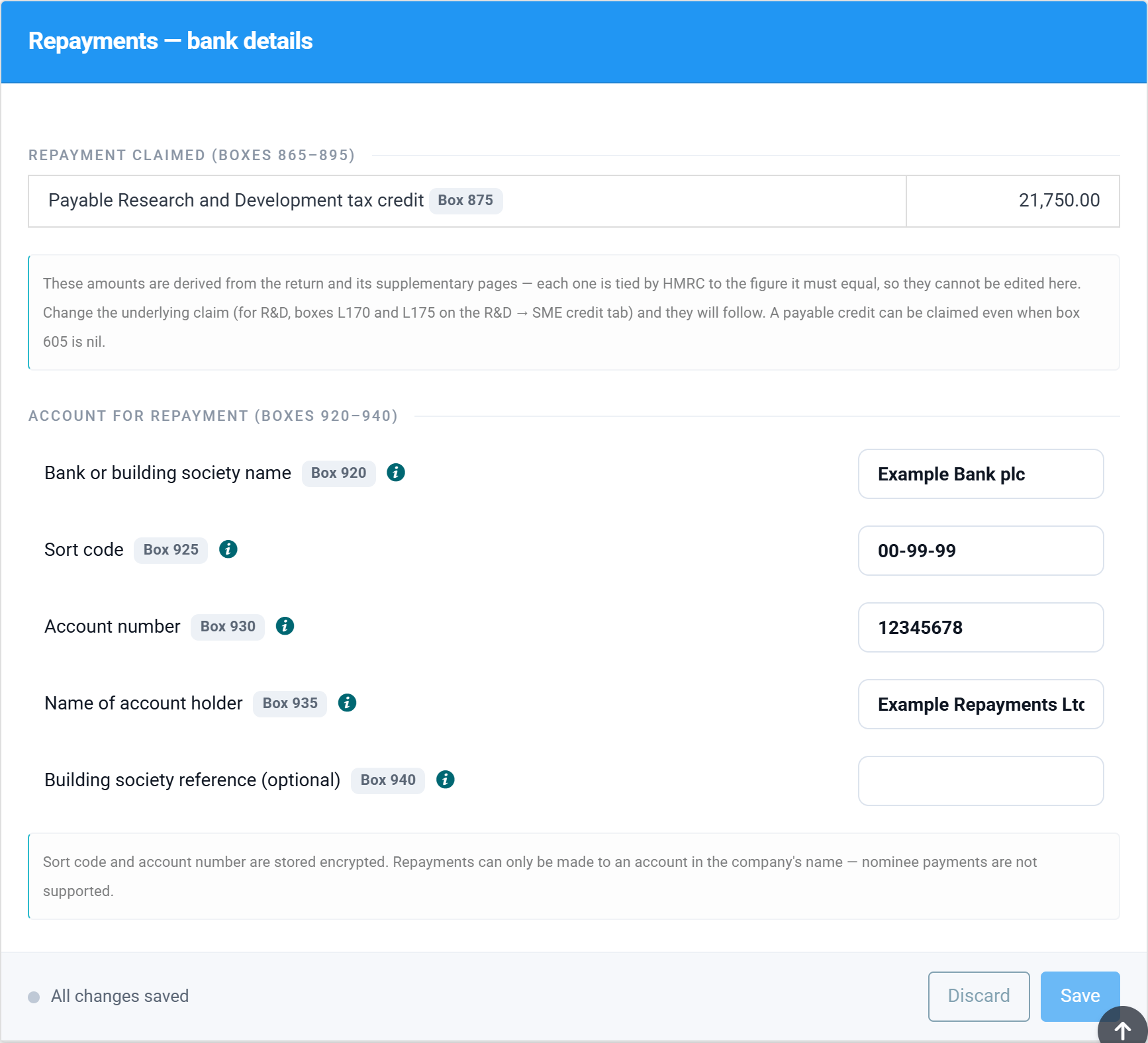
A few things worth knowing:
- The sort code and account number are stored encrypted and only decrypted to show them to you and to build the return.
- They carry forward. A new accounting period starts with the bank details from the company’s previous period filled in, so you only enter them once.
- You can enter them before you need them. Details saved on a period with no repayment are simply kept, and sent the moment a repayment arises.
- The repayment amounts cannot be edited here. Each one is tied by HMRC to the figure it must equal — change the underlying claim and the repayment follows.
A worked example
The screenshots come from a demonstration company, Example Repayments Ltd, with a 31 March 2026 year end. It is a young R&D-intensive company: sales of £30,000 against £150,000 of R&D staff and consumables and £20,000 of overheads, so it made a loss and owes no Corporation Tax at all.
| Step | Figure | Box |
|---|---|---|
| Qualifying R&D expenditure | £150,000 | L166 |
| Loss surrendered for a credit at 14.5% | £150,000 × 14.5% = £21,750 | L170 |
| Set off against other tax on the return | nil — there is no tax to set it against | L175 |
| Balance payable in cash | £21,750 | L180 → 875 |
| Tax overpaid | nil | 605 |
| Repayment due | ticked | 40 |
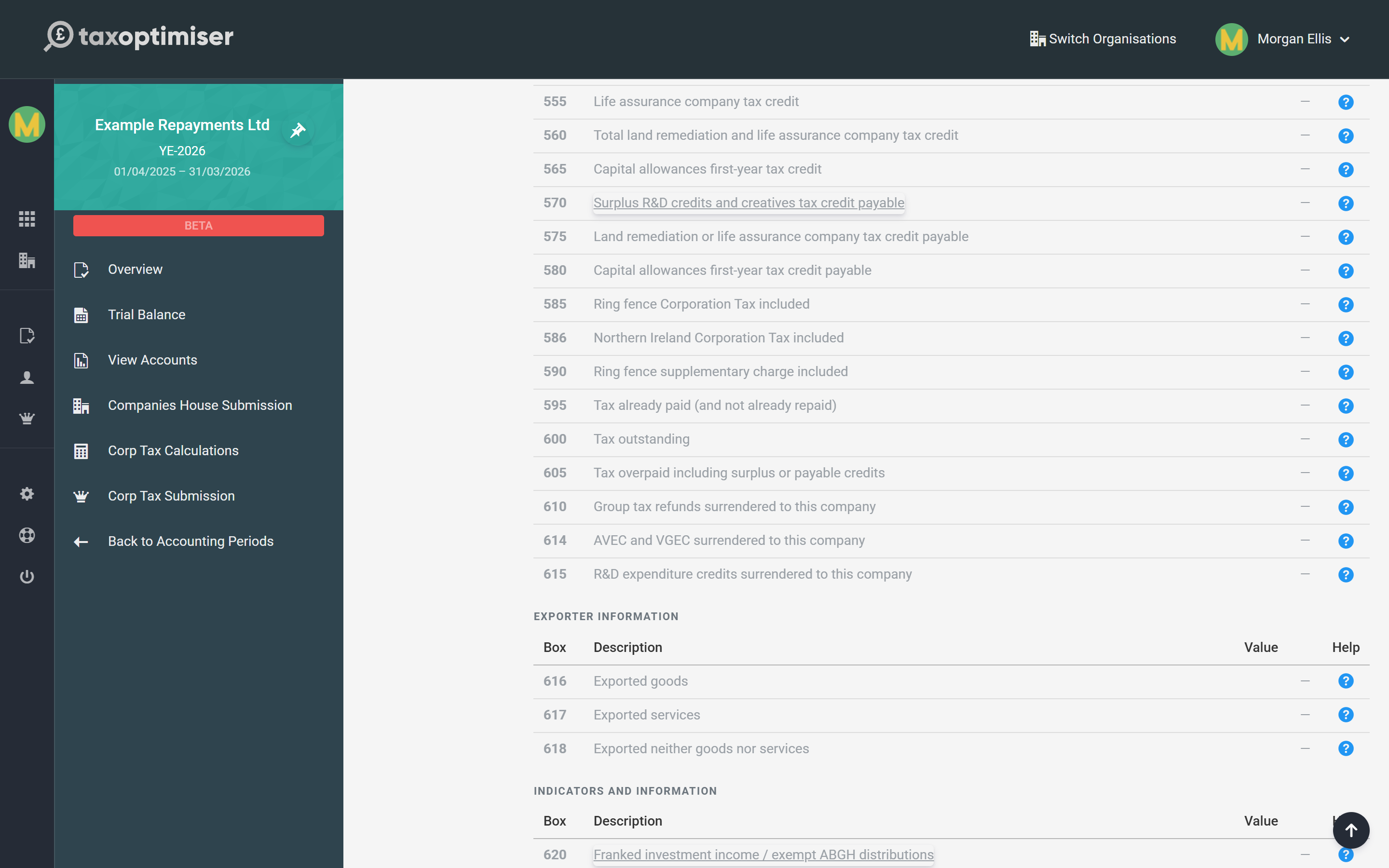
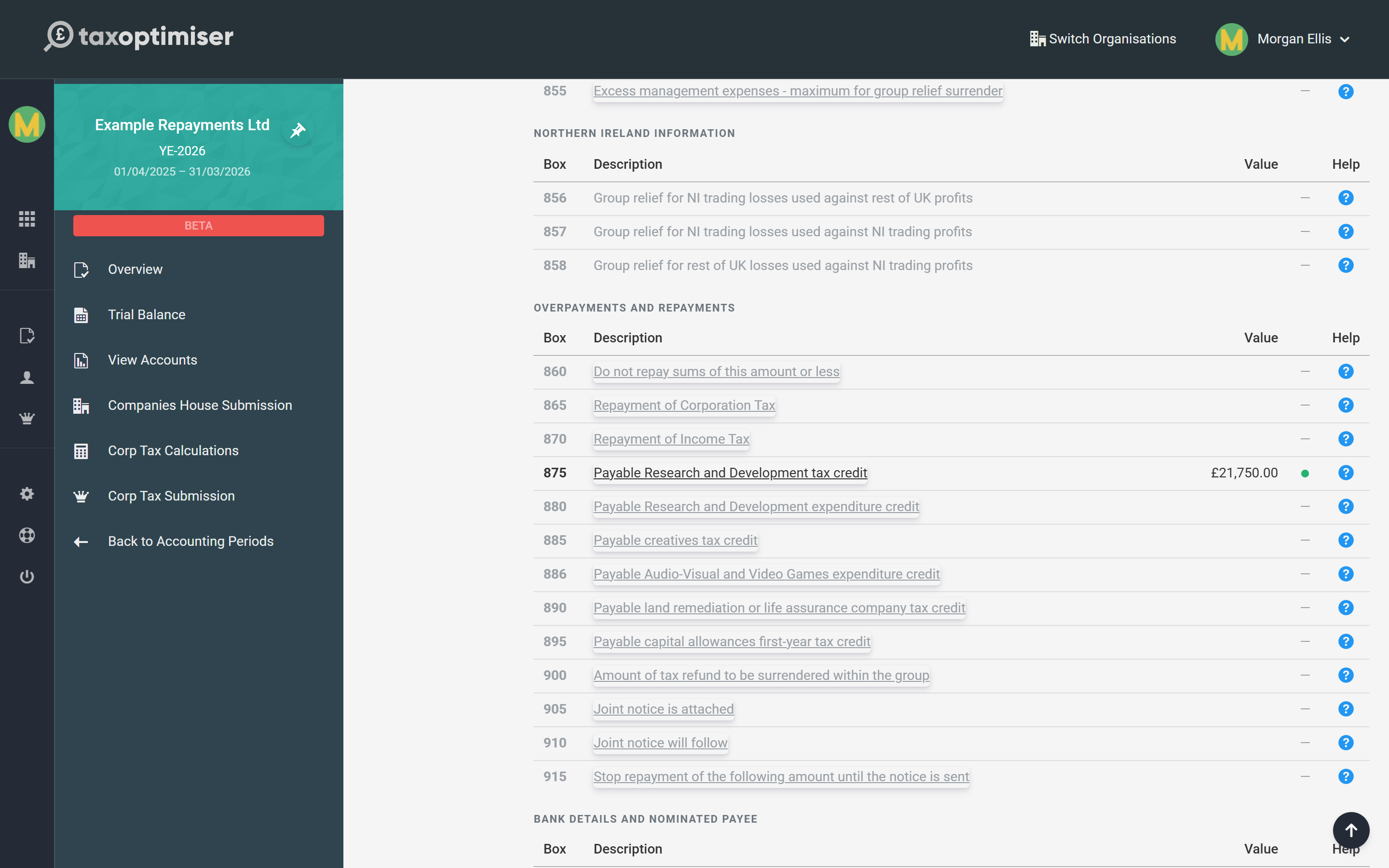
In the CT600 Boxes section the credit shows against box 875, and the bank details fill boxes 920 to 935.
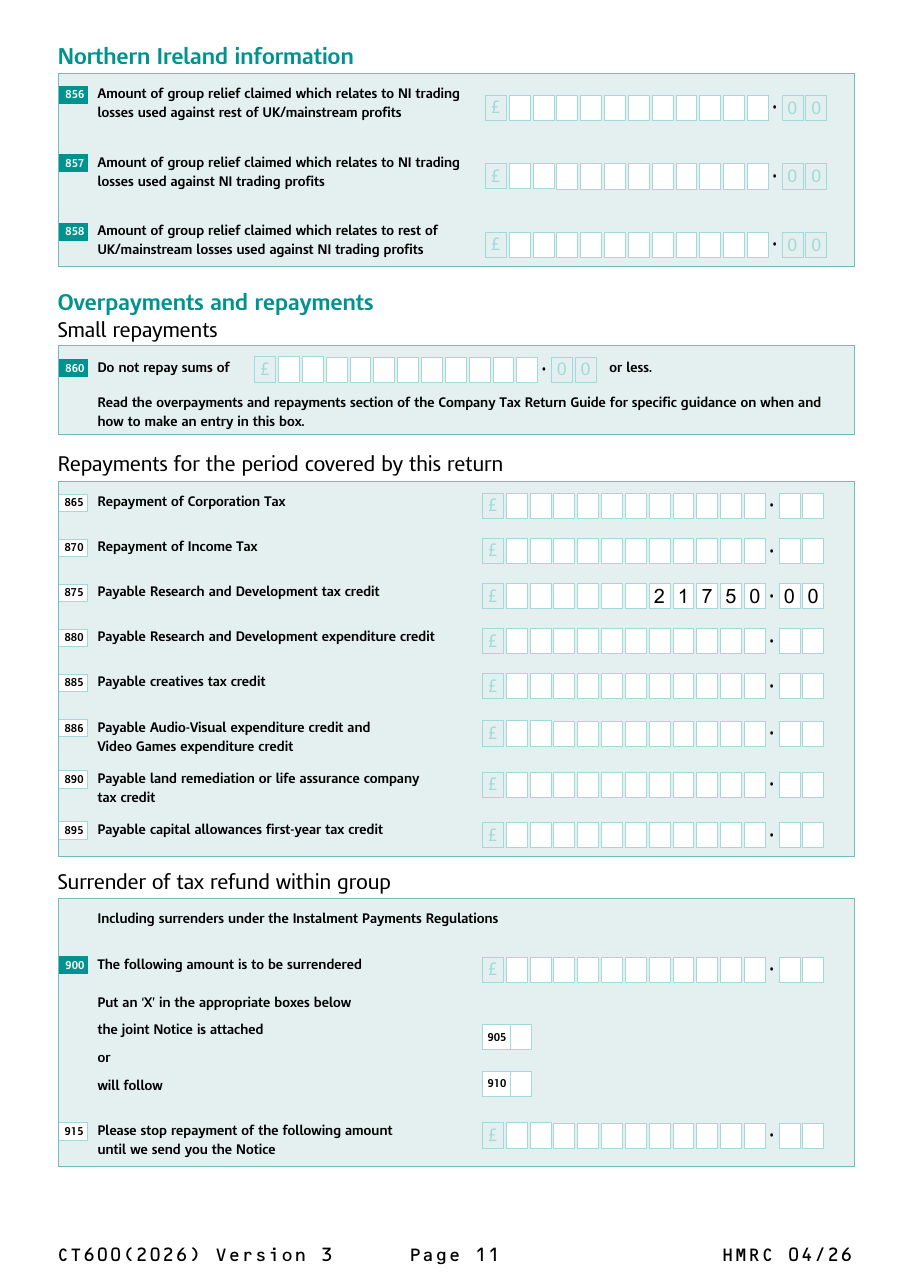
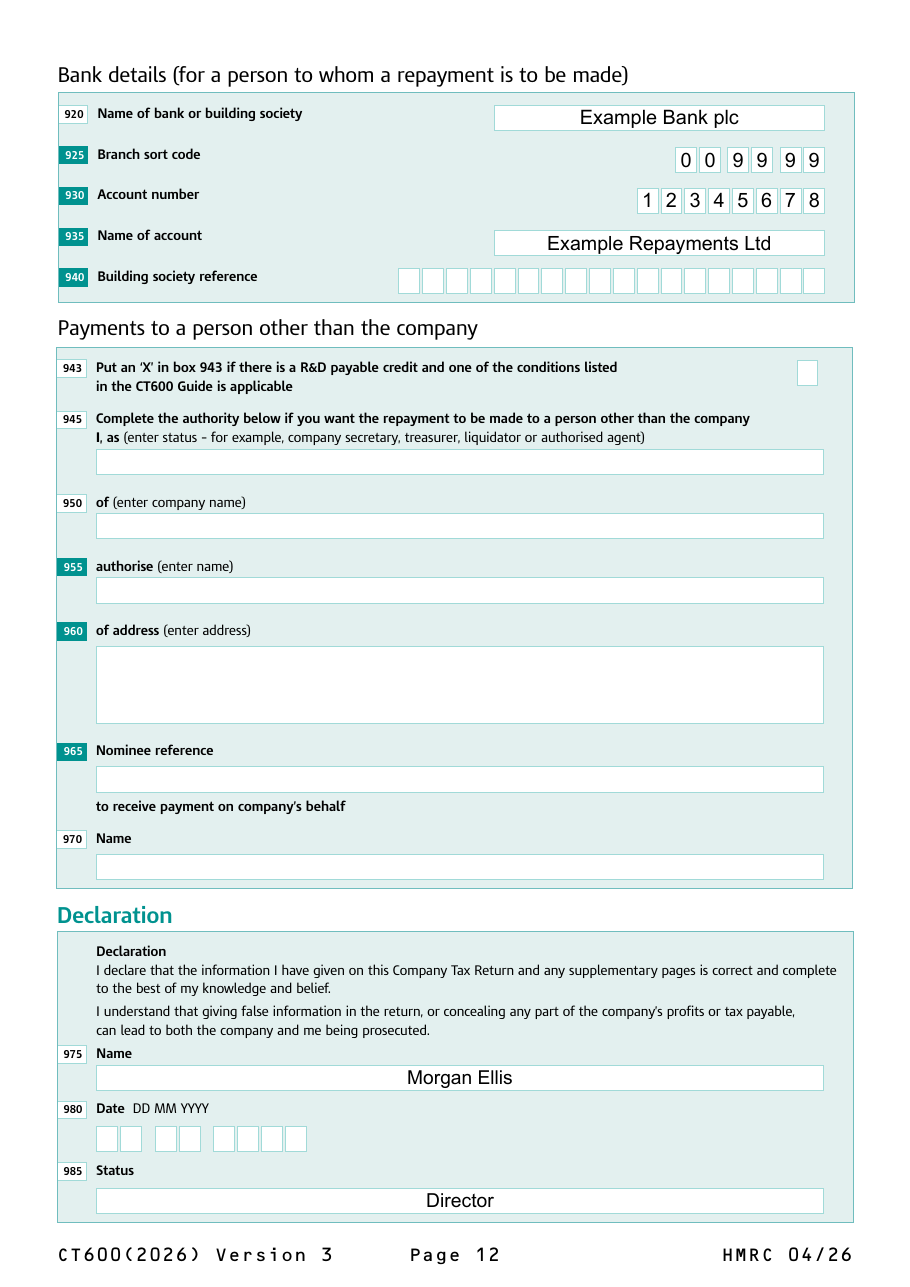
And the printed return carries both: page 11 of the CT600 with the repayment claimed, and page 12 with the account it should be paid into.
Losses carried back
A trading loss carried back to the previous year is the one kind of refund that does not go through boxes 865 to 895 of the loss-making year’s return. The claim is made on the loss-making year’s return — set it up on the Losses section and Tax Optimiser ticks box 45, “claim or relief affecting an earlier period” — but the tax being refunded is the earlier year’s. HMRC repays it against that year once it has processed the claim. See Losses in Corporation Tax for how to make the claim.
What Tax Optimiser does not fill in
A few repayment boxes are not captured by Tax Optimiser. They are left blank on the return, which is always valid, but you should know what that means:
- Box 595, tax already paid. Tax Optimiser does not record Corporation Tax paid before filing, so the return shows the full liability as outstanding. HMRC matches payments against its own records, and repays anything paid in excess once the return has been processed — you can also ask HMRC for the repayment directly.
- Box 860, the small-repayment limit. Not collected, so HMRC will repay any amount, however small.
- Boxes 900 to 915, surrendering a refund to another group company. Not supported — group companies that pay under a group payment arrangement should agree surrenders with HMRC directly.
- Boxes 945 to 970, paying someone other than the company. Not supported. Repayments go to an account in the company’s name. R&D tax credits claimed on or after 1 April 2024 can no longer be paid to a nominee such as an agent or adviser in any case, apart from narrow exceptions.
Two rules are checked before you can file: a sort code must have six digits and an account number eight. Bank details are only sent to HMRC once all four required fields (920 to 935) are complete — HMRC rejects a partial set.
How long a repayment takes
HMRC does not repay until it has processed the return, and it checks claims before paying — R&D claims in particular, which are now routinely reviewed and can take noticeably longer than an ordinary return. HMRC also sets a repayment against any other tax the company owes, such as unpaid PAYE, before paying the balance. Bank details on the return are the one thing you control: they avoid the extra delay of a payable order.
Where Corporation Tax itself was overpaid, HMRC pays repayment interest (“credit interest”) from the later of the date it was paid and the normal due date. That interest is taxable income of the company. HMRC publishes the current rate on gov.uk.
CT600 repayment boxes, box by box
Box numbering follows the CT600 (2026) Version 3 form. Boxes not covered here are in the CT600 box-by-box guide.
Box 40 — A repayment is due for this return period
An “X” box on page 1. Tax Optimiser ticks it whenever the return claims money back: box 605 has an amount, or a payable credit or Income Tax repayment is claimed in box 870, 875, 880, 885 or 886. It can be ticked while box 605 is nil — see why above.
Box 45 — Claim or relief affecting an earlier period
Ticked when the return carries a claim, such as a loss carry-back, that changes an earlier period’s tax. The refund belongs to that earlier period, not to boxes 865–895 here.
Box 515 — Income Tax deducted from gross income included in profits
Income Tax already suffered at source on income the company has included in its profits. In Tax Optimiser it is the figure in Income Tax Suffered plus the Income Tax column of the Non Trade Credit rows.
Box 520 — Income Tax repayable to the company
The part of box 515 that is more than the tax chargeable in box 510 — Income Tax the company has suffered and does not need, because its Corporation Tax is smaller. Worked out for you; when it has an amount, box 525 is nil.
Box 525 — Self-assessment of tax payable before restitution tax and coronavirus overpayments
Box 510 less box 515, never below nil. The starting point for the tax reconciliation.
Box 530 — Research and Development credit
Only the part of an R&D credit set off against the company’s liabilities on this return — on an ERIS claim, the amount in L175. A pure cash claim leaves it nil and pays out through box 875 instead.
Box 545 — Total of R&D credit, creatives tax credit and AVEC/VGEC
Boxes 530, 540 and 541 added together.
Boxes 570 to 580 — Credits payable
The parts of the credits set against the liability that are more than the liability: surplus R&D and creatives credit (570), land remediation or life assurance credit (575) and capital allowances first-year tax credit (580).
Box 595 — Tax already paid (and not already repaid)
Corporation Tax for this period paid before the return is filed. Not captured by Tax Optimiser — see above.
Box 600 — Tax outstanding
Box 525 less the credits (545, 560, 565) and tax already paid (595), where that leaves something to pay.
Box 605 — Tax overpaid including surplus or payable credits
The other side of box 600: where the credits and tax already paid are more than box 525, the excess. Box 600 and box 605 can never both have an amount. Box 605 is the pot that boxes 865 to 895 are claimed from, but a payable credit in box 875, 880, 885 or 886 is claimed even when box 605 is nil.
Box 860 — Do not repay sums of this amount or less
An optional floor: HMRC keeps any overpayment at or below this figure rather than repaying it, and sets it against a later bill. Not collected by Tax Optimiser, so any amount is repaid.
Box 865 — Repayment of Corporation Tax
Whatever is left of box 605 once every credit below has been claimed in its own box — the plain Corporation Tax refund. Worked out for you.
Box 870 — Repayment of Income Tax
Always equal to box 520. HMRC rejects a return where the two differ.
Box 875 — Payable Research and Development tax credit
The SME or ERIS credit paid in cash: always equal to CT600L box L180 (the credit claimed in L170 less any part set off in L175). Claimed even when box 605 is nil.
Box 880 — Payable Research and Development expenditure credit
The RDEC left after the CT600L steps have set it against this and other tax: always equal to CT600L box L125.
Box 885 — Payable creatives tax credit
A payable film, television, video games, theatre, orchestra or museum credit: always equal to CT600P box P330.
Box 886 — Payable Audio-Visual and Video Games expenditure credit
The AVEC or VGEC paid out after Step 6 of the CT600P: always equal to box P190. HMRC makes the box mandatory whenever P190 has an amount.
Box 890 — Payable land remediation or life assurance company tax credit
Equal to box 575.
Box 895 — Payable capital allowances first-year tax credit
Equal to box 580, and only for accounting periods starting on or before 31 March 2020 — first-year tax credits were withdrawn after that, and the box is closed on later returns.
Boxes 900 to 915 — Surrender of tax refund within group
To give some or all of a refund to another company in the same group: the amount surrendered (900), whether the joint notice with the other company is attached (905) or will follow (910), and any amount HMRC should hold until it arrives (915). Not supported by Tax Optimiser.
Box 920 — Name of bank or building society
From Repayments → Bank or building society name.
Box 925 — Branch sort code
Six digits, sent without dashes or spaces.
Box 930 — Account number
Eight digits.
Box 935 — Name of account
The account holder’s name, up to 28 characters. Boxes 920 to 935 are all required together — if any is missing none is sent, and HMRC repays by payable order.
Box 940 — Building society reference
Only for building society accounts with a roll or reference number. Optional.
Box 943 — R&D payable credit condition
An “X” box for the narrow cases where an R&D payable credit may still be paid to someone other than the company, as listed in HMRC’s guide. Tax Optimiser does not support nominee payments, so leave it clear.
Boxes 945 to 970 — Payments to a person other than the company
The authority to pay a repayment to a nominee: the status of the person signing it (945), the company’s name (950), the nominee’s name (955) and address (960), the nominee’s reference (965) and the name of the person receiving payment on the company’s behalf (970). Not supported — repayments are made to the company’s own account.
Common questions
Why is box 605 empty when my company is claiming an R&D tax credit?
Box 605 only counts credits set off against the company’s own tax. A loss-making company has no tax to set the credit against, so the whole credit is paid in cash through box 875 and box 605 stays nil. Box 40 is still ticked to tell HMRC a repayment is due. This is correct, and HMRC expects it.
How do I claim a Corporation Tax refund on the CT600?
Complete the claim that creates the refund — the R&D, creative or Income Tax figures — and the return fills the repayment boxes 865 to 895 and ticks box 40. Then give HMRC the company’s bank details in boxes 920 to 935 so the money is paid straight into the account.
What happens if I do not give bank details on the CT600?
HMRC still makes the repayment, but by payable order — a cheque posted to the company — which is slower. Tax Optimiser warns you on the Repayments section and on the submission steps whenever a repayment is claimed without bank details.
How long does a Corporation Tax repayment take?
HMRC repays once it has processed the return and checked the claim. R&D claims are routinely reviewed and can take longer than an ordinary return. HMRC also sets a repayment against any other tax the company owes before paying the balance.
Can the R&D tax credit be paid to my accountant or adviser?
No. For R&D claims made on or after 1 April 2024, the payable credit must be paid to the company’s own bank account, apart from narrow exceptions set out in HMRC’s guide. Tax Optimiser only sends repayment details for an account in the company’s name.
Does HMRC pay interest on a Corporation Tax repayment?
Yes, on Corporation Tax that was overpaid, from the later of the date it was paid and the normal due date. The interest is taxable income of the company. Payable R&D and creative credits are not overpaid tax, so interest works differently for them.
How do I get a refund from carrying a loss back?
Make the carry-back claim on the loss-making year’s return (box 45 is ticked). The refund is of the earlier year’s tax, so it does not appear in the repayment boxes of this return — HMRC repays it against the earlier year once it has processed the claim.
Do I have to enter bank details every year?
No. Tax Optimiser carries them forward from the company’s previous accounting period, so they are already filled in on the next return. Check they are still right before you file.
Where to go next
- CT600L: R&D expenditure credit and SME payable credit — the claim behind boxes 875 and 880.
- CT600 box-by-box guide — every box on the main return.
- CT600A and loans to participators — the other refund that goes through a CT600 supplementary page.
- HMRC’s Company Tax Return guide, section “Overpayments and repayments”.