
Most of what a trading company earns is trading income, and it is taxed as part of the trading profit in box 155 of the Company Tax Return. Now and then a company receives something that is not part of its trade and does not fit any of the form’s other income boxes either — a one-off fee for something the company does not normally do, say. That income goes in box 205, “Income not falling under any other heading”, and in Tax Optimiser it is entered in the Non Trade Income section of the Corp Tax workspace. This guide explains what belongs there, what does not, how the grid moves the income out of the trading profit and onto its own line, and what each figure does to the return.
What counts as non-trade income
The Company Tax Return has a separate box for each kind of income a company can have. Box 205 is the one left over: income that is taxable but is not trading income and does not belong in any other box. Before you use it, check that the income really has nowhere else to go:
| If the income is… | It goes in | In Tax Optimiser |
|---|---|---|
| Part of the company’s normal business | Box 155, trading profits | Leave it in the trial balance — nothing to enter |
| Interest, or any other return on money the company has lent (bank deposits, loan notes, a loan to another company) | Box 170 | Non Trade Credit |
| Rent or other income from land and buildings | Box 190 | The P & L section, with the line marked UK property |
| A gain on selling an investment or other capital asset | Box 210 | Not calculated — see below |
| Dividends from UK and most overseas companies | Nowhere — they are usually exempt | Nothing to enter |
| Something taxable that fits none of the above | Box 205 | Non Trade Income |
In practice box 205 picks up casual, one-off income: a fee for introducing a buyer to a property deal the company is not in the business of doing, commission on a transaction unconnected with the trade, or a sundry receipt that is taxable under the Corporation Tax “sweep-up” charge on miscellaneous income. If the company does the same thing often enough, it is probably part of the trade after all — and then it belongs in box 155 and needs no entry here.
Getting the box wrong rarely changes the tax, but it does change the return. Box 205 is added into total profits alongside the trading profit, so income put in the wrong box is usually taxed at the same rate either way. It matters for everything that depends on the trading profit on its own — a trading loss, for example, can be wiped out or created by the wrong classification — and HMRC compares the boxes with the accounts.
Enter it in Tax Optimiser
Open the accounting period’s Corp Tax workspace and choose Non Trade Income in the left-hand menu.
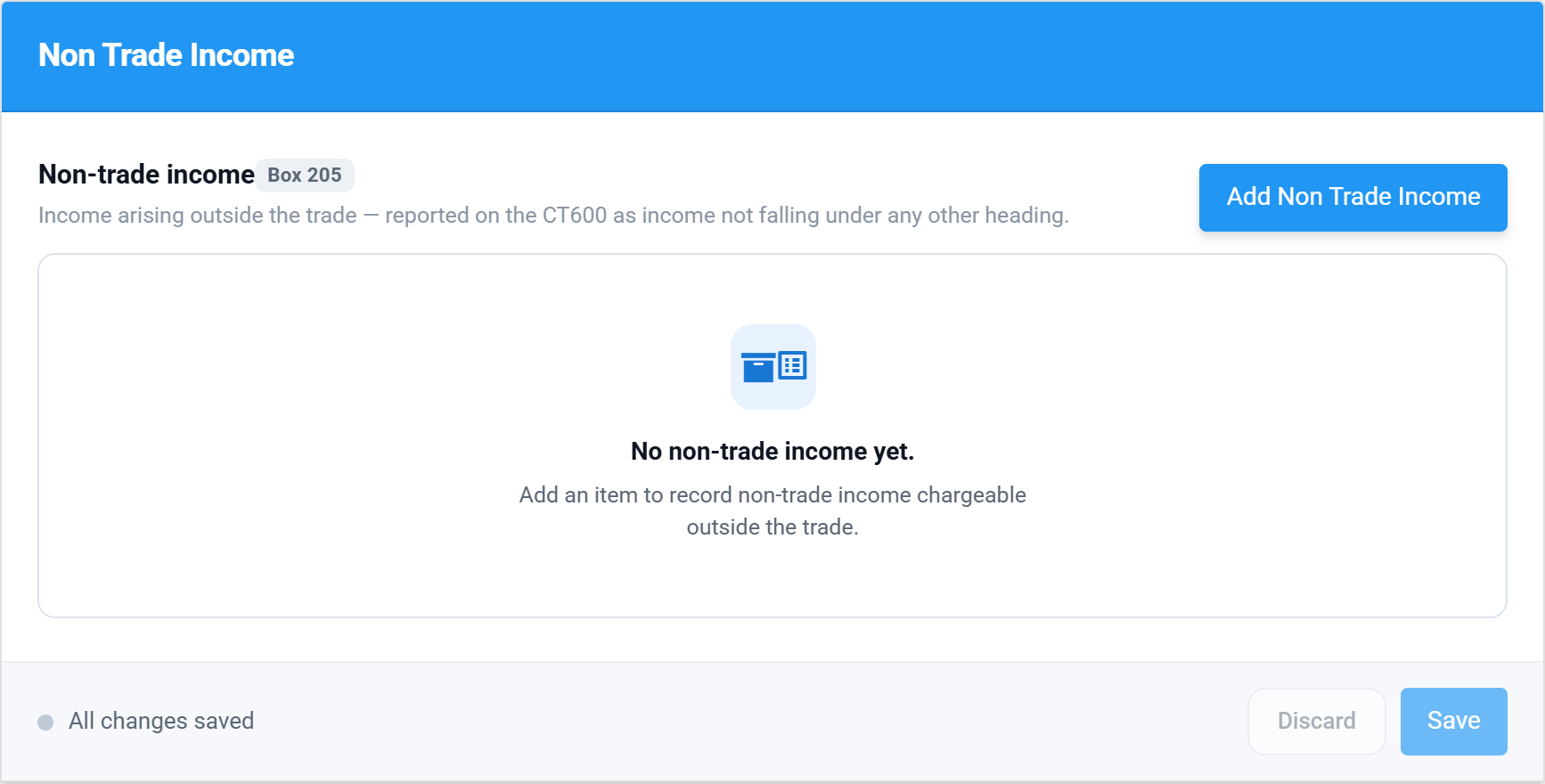
Choose Add Non Trade Income and fill in one row per item. The grey Box 205 chip beside the heading shows where the figures go, and hovering a column heading explains the column.
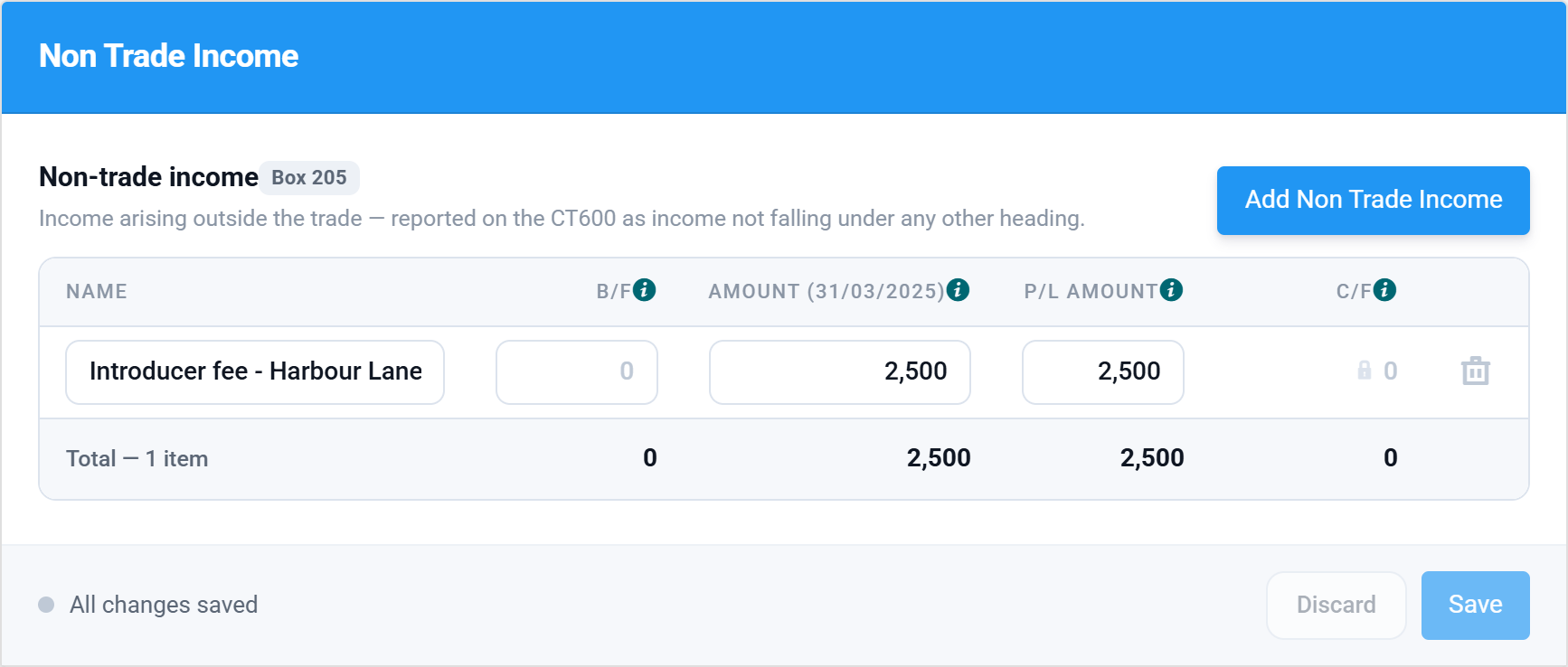
| Column | What goes in it |
|---|---|
| Name | A description you and a reviewer will recognise. It prints on the computation. |
| B/F | Brought forward: anything taxed in an earlier period but not yet recognised in the accounts. Usually blank. |
| Amount | The income taxable in this period. This is the figure that goes to box 205. A period of account longer than 12 months shows a second Amount column for the second return. |
| P/L Amount | How much of the income is included in the profit and loss account. This is the figure taken out of the trading profit. |
| C/F | Calculated: B/F + Amount − P/L Amount. Normally nil. A balance means the tax and the accounts disagree about when the income arises, and it is carried to the next period’s B/F. |
For the common case — income that is in this year’s accounts and taxable this year — enter the same figure in Amount and P/L Amount and leave B/F blank. Then choose Save.
What it does to the computation
Non-trade income is almost always already in the profit and loss account, usually as “other income”, which means it is already in the trading profit Tax Optimiser starts from. The grid moves it, in two steps:
- Out of the trade. The P/L Amount is deducted from the profit per accounts as “Non-trade income”, under non-taxable income, on the accounts adjustments page.
- Into its own line. The Amount is added to total profits as “Miscellaneous non-trade financial profits”, which is box 205.
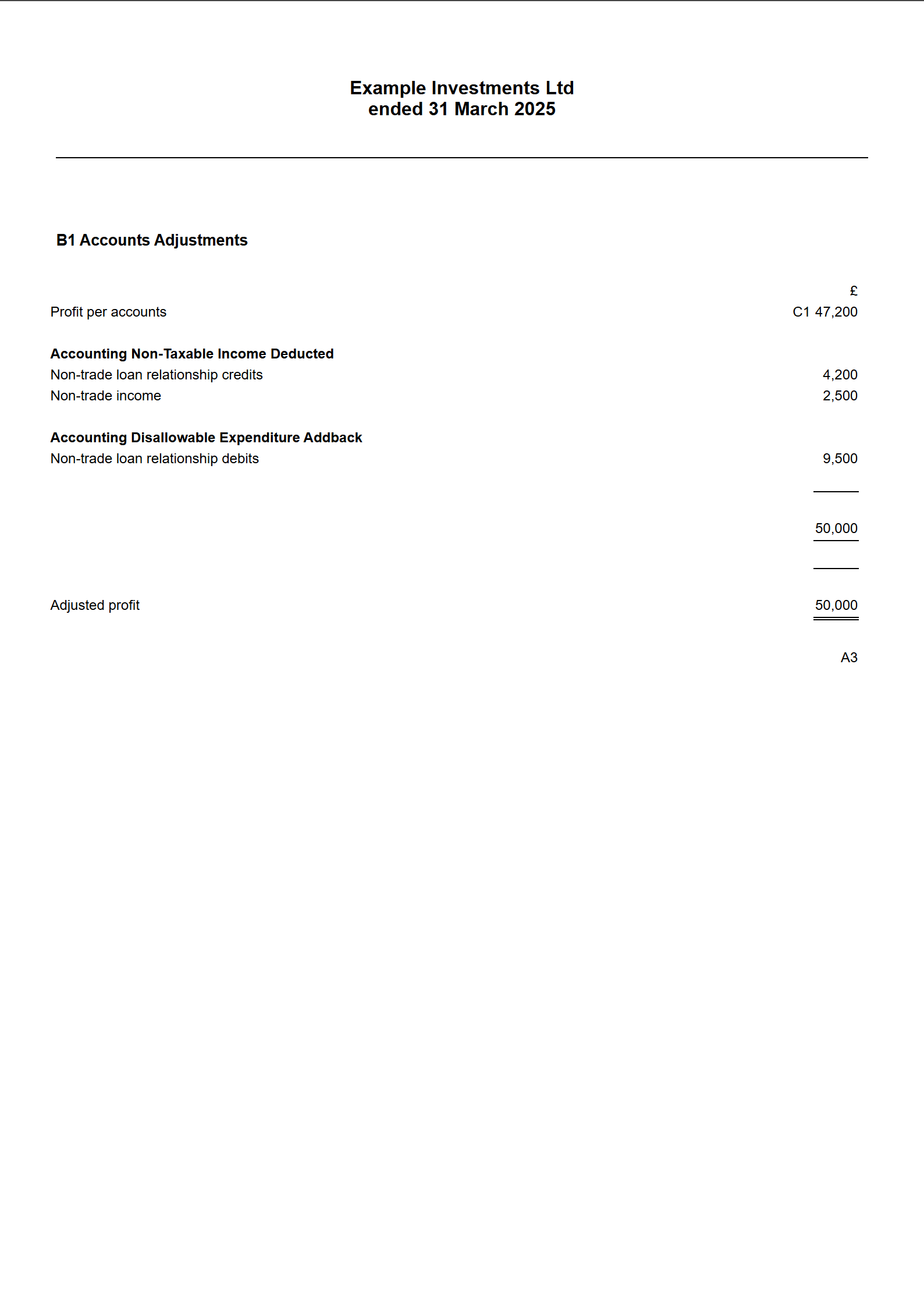
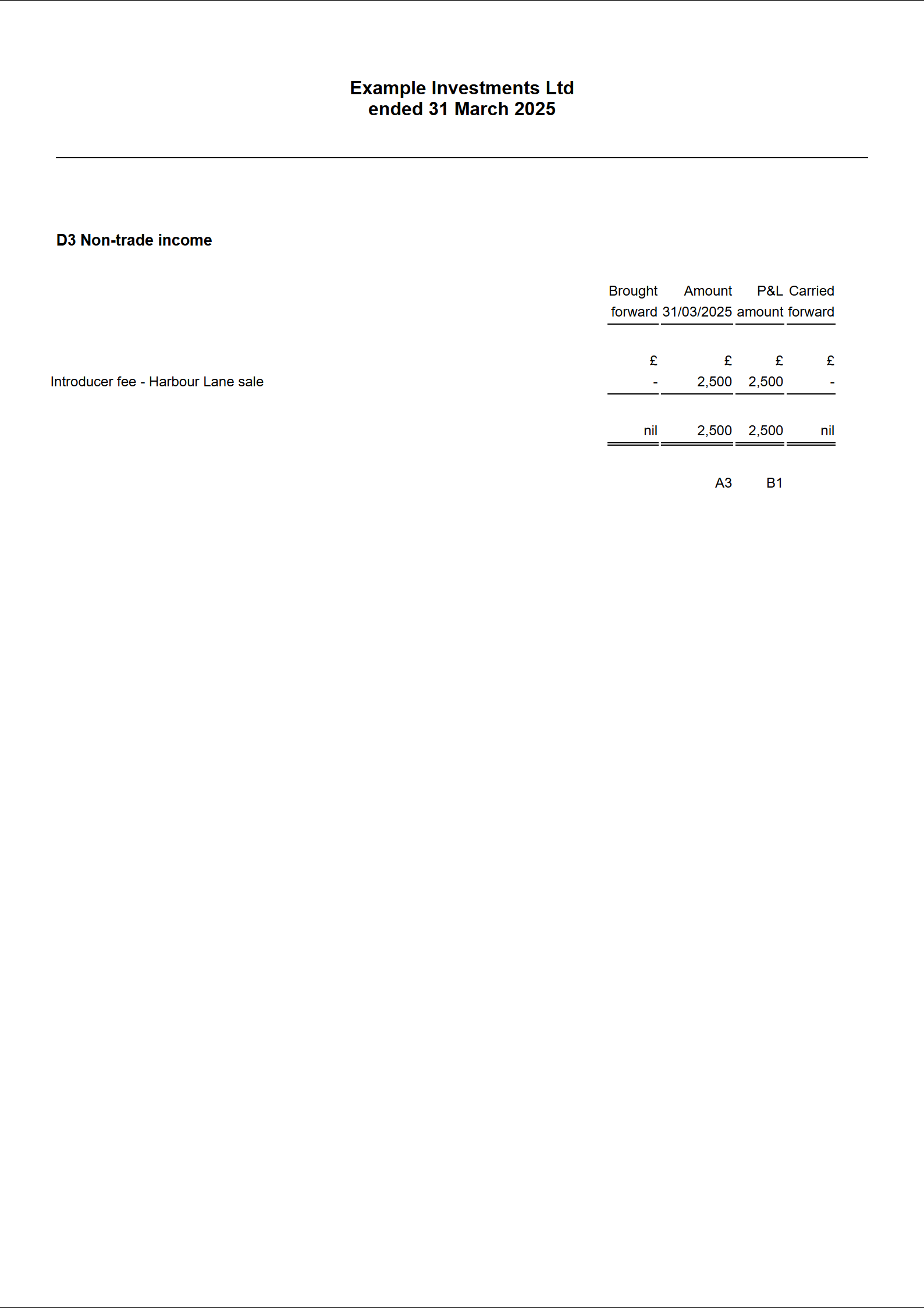
The computation prints the grid as its own schedule, so a reviewer can see each item and where it went.
If the income is not in the profit and loss account at all — it was taken straight to reserves, for example — enter it in Amount and leave P/L Amount at nil. Nothing is taken out of the trade, because it was never in it.
What it does to the return
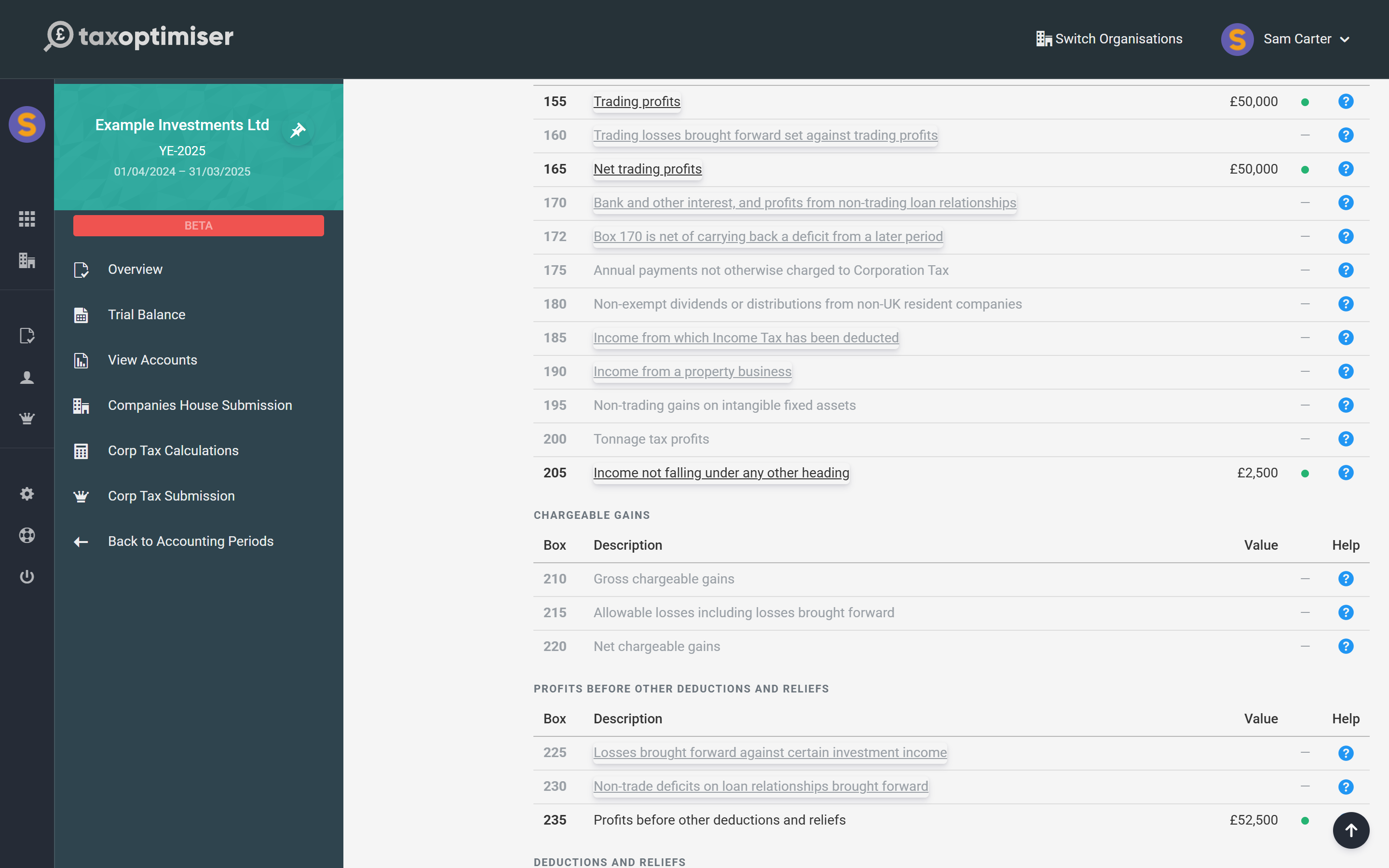
The CT600 Boxes section shows the result: box 155 carries the trading profit without the income, and box 205 carries the income.
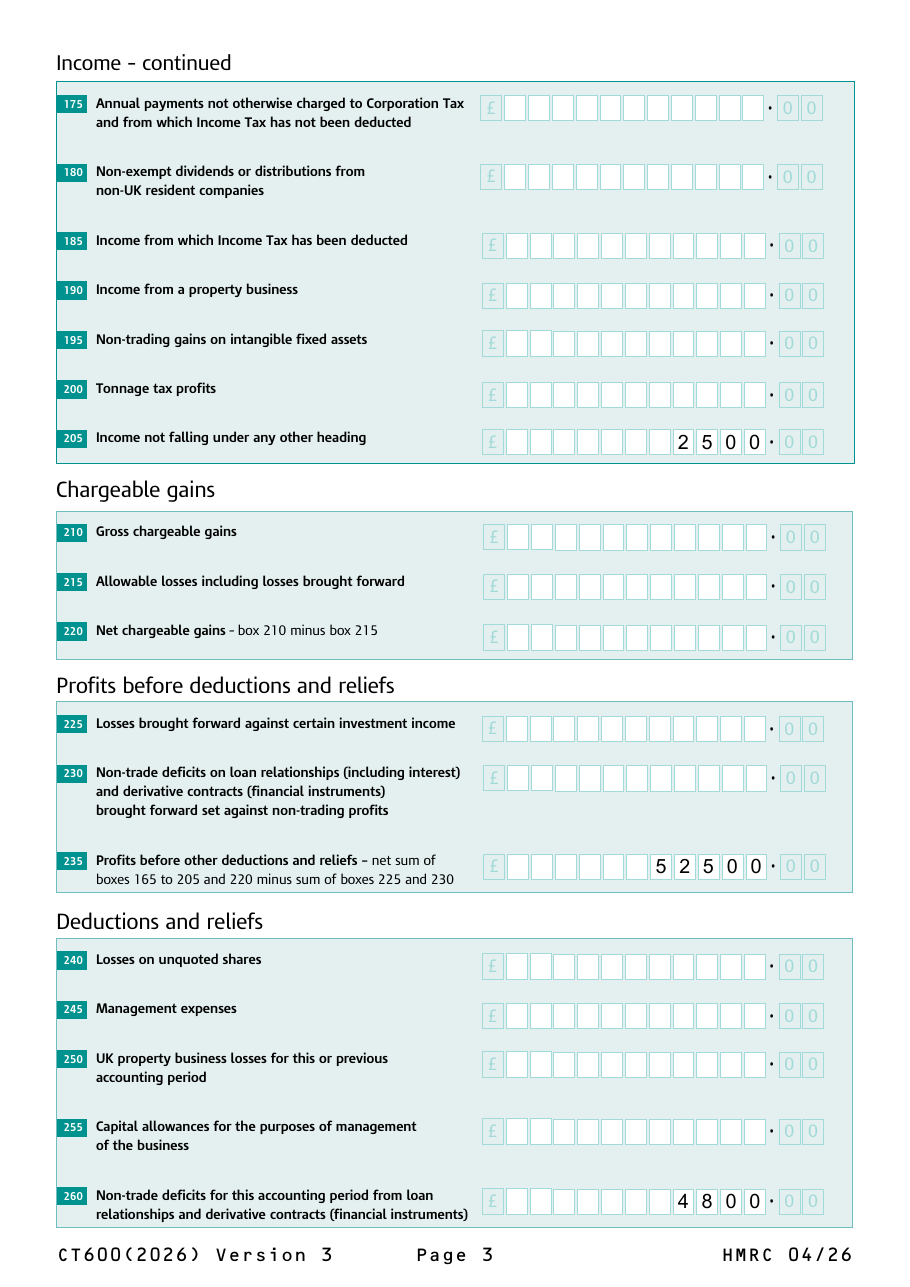
And on the CT600 itself it lands on page 3, just above chargeable gains, and flows into box 235.
A worked example
The screenshots come from a demonstration company, Example Investments Ltd, with a 31 March 2025 year end. Its trade made £50,000. It also earned a one-off £2,500 introducer fee for putting a buyer in touch with the seller of a property — not something the company does for a living — and the bookkeeper posted it to “Commissions receivable”, so it sits inside the £47,200 profit per accounts. (The company also has some interest received and paid; the Non Trade Credit and Non Trade Debit guides follow the same company.)
| Step | Figure |
|---|---|
| Introducer fee, entered with Amount £2,500 and P/L Amount £2,500 | — |
| Deducted from the trade as “Non-trade income” | (£2,500) |
| Box 155 — trading profits | £50,000 |
| Box 205 — income not falling under any other heading | £2,500 |
| Box 235 — profits before other deductions and reliefs | £52,500 |
The tax is the same as if the fee had stayed in the trade — it is all taxed at the company’s Corporation Tax rate — but the return now describes the company correctly, and the £50,000 trading profit is the figure that trading-loss and other trade-only rules look at.
The Other Income section
The Corp Tax workspace also has an Other Income section with a single box 205 figure. It predates the grid and adds to the same box, but it does not take anything out of the trade — so use it only for box 205 income that is not in the profit and loss account at all. For anything in the accounts, use Non Trade Income, or the income will be taxed twice: once in the trade and again in box 205. Whatever is in both sections is added together in box 205.
Things to check
- Taxed twice. If the income is in the profit and loss account, the P/L Amount must be filled in. An Amount with no P/L Amount leaves the income in the trade and in box 205.
- Interest is not box 205. Interest and other returns on money lent are loan relationship credits and go through Non Trade Credit to box 170, where they can be netted against interest paid.
- Dividends received are not income here. Most dividends a company receives are exempt from Corporation Tax. Do not enter them in any non-trade grid.
- Chargeable gains are not calculated. A profit on selling shares, land or another capital asset is a chargeable gain (box 210), worked out with indexation and reliefs Tax Optimiser does not compute. Take any accounts profit on disposal out of the trade and calculate the gain separately.
- Income tax deducted at source. If the payer deducted UK income tax, enter the tax in the Income Tax Suffered section so it is credited in box 515.
- Charities. For a charity claiming full exemption on its CT600E, box 205 is nil — the income is covered by the exemption.
CT600 box by box
Box numbering follows the CT600 (2026) Version 3 form. Every other box is in the CT600 box-by-box guide.
Box 155 — Trading profits
The trading profit after tax adjustments. Every Non Trade Income row’s P/L Amount has been taken out of it, so it holds the trade and nothing else.
Box 205 — Income not falling under any other heading
The total of the Amount column of the Non Trade Income grid, plus the figure in the Other Income section, in whole pounds. On a period of account longer than 12 months each return takes its own Amount column; the Other Income figure is split between the two returns by days.
Box 235 — Profits before other deductions and reliefs
Boxes 165 to 205 and 220 added together, less boxes 225 and 230. Box 205 is part of it, so non-trade income is available to absorb reliefs claimed against total profits — a non-trading deficit in box 260, for instance.
Common questions
What goes in CT600 box 205?
Taxable income that is not part of the company’s trade and does not belong in any other box on the return — typically casual, one-off receipts such as a fee or commission for something the company does not normally do. Interest goes in box 170, property income in box 190 and chargeable gains in box 210 instead.
Is non-trade income taxed at a different rate?
No. Box 205 is added to the other profits in box 235 and taxed at the company’s normal Corporation Tax rate, with marginal relief where it applies. Putting income in the right box changes how the return describes the company, not the rate.
Why does Tax Optimiser deduct the income before adding it back?
Because the income is usually already in the profit and loss account, and so already in the trading profit. The P/L Amount is taken out of the trade so the trading profit in box 155 is the trade alone, and the Amount is then taxed on its own line in box 205.
What is the difference between Amount and P/L Amount?
Amount is what is taxable in this period and goes to box 205. P/L Amount is what the profit and loss account includes and is taken out of the trade. They are normally the same figure; they differ only when the tax and the accounts recognise the income in different periods, or when the income is not in the accounts at all.
Should bank interest go in Non Trade Income?
No. Bank interest is a loan relationship credit. Enter it in the Non Trade Credit section, which puts it in box 170 and nets it against any non-trade interest the company pays.
Do I enter dividends received as non-trade income?
No. Most dividends a UK company receives, from UK or overseas companies, are exempt from Corporation Tax and are not reported as income on the CT600.
What is the Other Income section for?
It adds a figure straight to box 205 without taking anything out of the trade. Use it only for box 205 income that is not in the profit and loss account; for anything in the accounts, use Non Trade Income so it is not taxed twice.
Where to go next
- Non-trade loan relationship credits and box 170 — interest the company receives.
- Non-trade loan relationship debits and deficits — interest the company pays, and boxes 260, 263 and 795.
- CT600 box-by-box guide — every box on the main return.
- HMRC’s Company Tax Return guide.