
A Community Interest Company (CIC) is a limited company set up to benefit the community rather than its owners. It is registered at Companies House like any other company — usually limited by guarantee, sometimes by shares — with two extra features: an asset lock, which stops its assets being taken out for private benefit, and the community interest test, which the CIC Regulator checks when the company is formed. For tax, a CIC is simply a company. So in Tax Optimiser almost everything works exactly as it does for any limited company. The one addition is a yearly report to the Regulator, the CIC34, which Tax Optimiser helps you prepare.
What is different for a CIC, and what isn't
- The Corporation Tax return is a normal CT600. A CIC is not a charity, even when its purpose is charitable, so it gets no charitable tax reliefs: its profits are taxed at the normal rates, there is no CT600E exemption page, and on the return the Corporation Tax company type stays as Not applicable. Build the computation and file the return exactly as the Corporation Tax series describes.
- The statutory accounts are normal company accounts. A CIC prepares and files annual accounts at Companies House like any other company, and a small CIC can use the micro-entity or the small-company format. See the statutory accounts guide.
- The CIC34 is the extra. Every year a CIC must deliver a community interest company report (form CIC34) to Companies House with its accounts. It explains what the company did for the community, how it involved the people it affects, what its directors were paid, and whether any assets left the company other than at full value. The CIC34 goes to Companies House, not HMRC — it is never part of the CT600.
Tell Tax Optimiser the company is a CIC
Open your organisation settings. On the Company Details tab, with Organisation Structure set to Limited Company, two settings appear:
- Limited By — Limited By Guarantee for most CICs, which have members rather than shareholders; Limited By Share if the CIC has issued shares.
- Community Interest Company (CIC) — tick it.
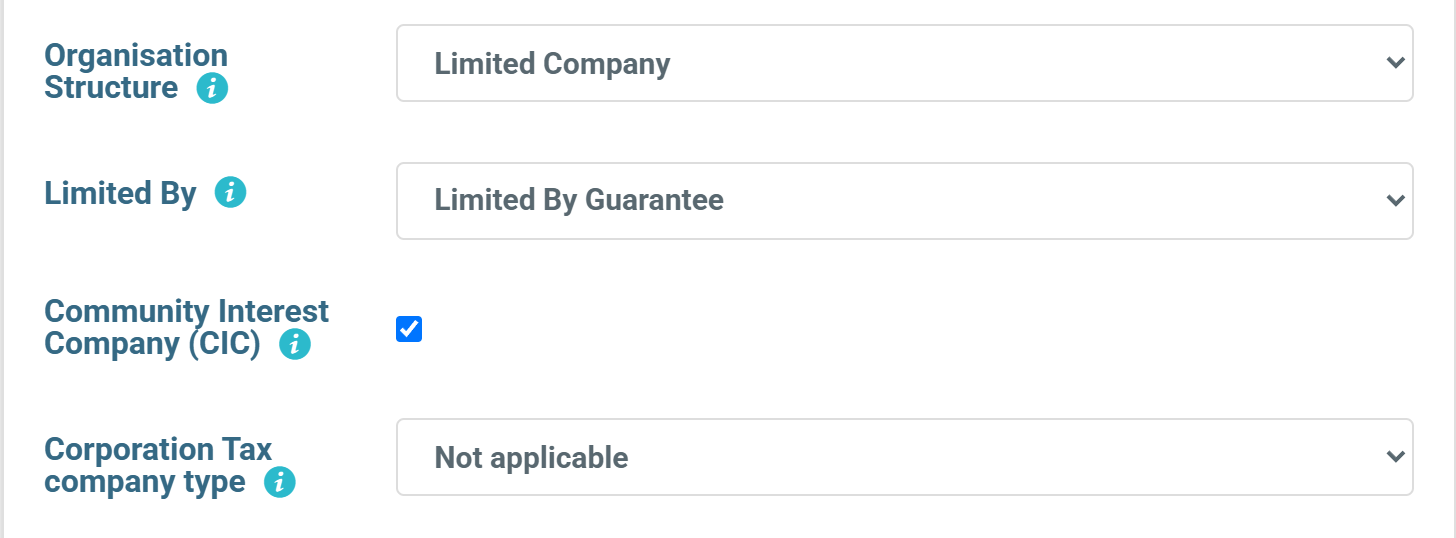
If the organisation has its Companies House number saved, you may find both are already set: when Tax Optimiser syncs with the Companies House register it reads the company's type and whether it is a CIC, and fills them in for you. A sync only ever adds the CIC tick; it never removes one you have set yourself.
If you are an accountant setting up a client, the same two settings are on the Create organisation screen under the company structure.
Leave the Corporation Tax company type at “Not applicable”. It is tempting to choose Charity or owned by a charity for a community company, but a CIC cannot be a registered charity and cannot claim charitable exemption. Choosing it would add a CT600E claim the company is not entitled to make.
Where the CIC34 lives
Because the CIC34 is delivered with the accounts, Tax Optimiser puts it with the accounts filing. Open the accounting period, go to Companies House Submission, and a CIC sees this notice above the submission steps:

Choose Prepare CIC34 report. The report is saved against the accounting period, so each year has its own, and the company name, number and year end are taken from the period so they always match the accounts the report is filed with — the Regulator rejects a report whose name or date does not match.
Complete the report
The form follows the Regulator's own CIC34 template, part by part:
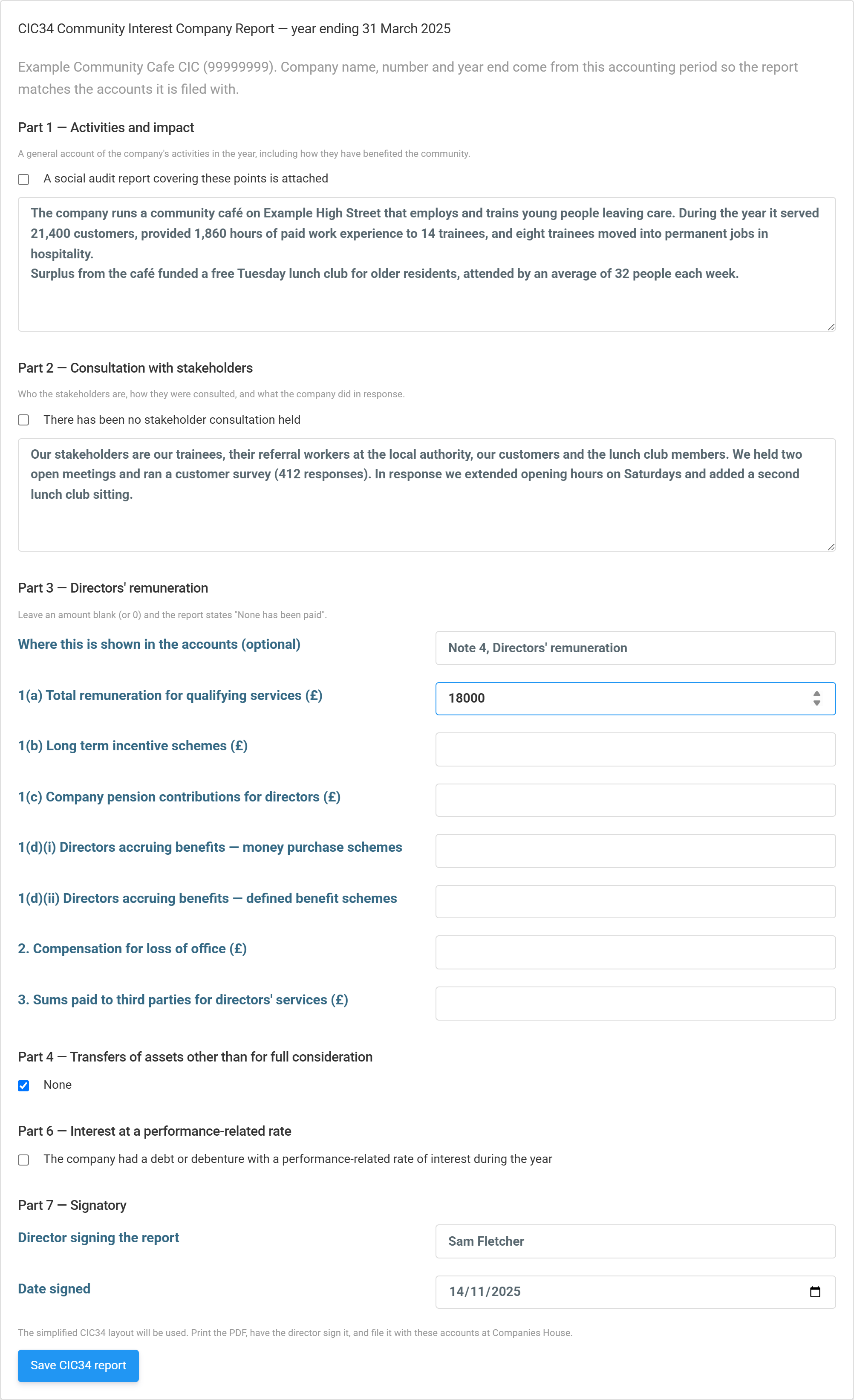
- Part 1 — Activities and impact. What the company did in the year and how it benefited the community. Be specific: numbers of people helped, hours delivered, what the surplus paid for. If you have a social audit report that covers this, tick the box instead and attach it when you file.
- Part 2 — Consultation with stakeholders. Who is affected by the company’s work, how you asked them, and what you changed as a result. If there was no consultation you must say so — tick There has been no stakeholder consultation held.
- Part 3 — Directors’ remuneration. Pay, long-term incentive schemes, pension contributions, the number of directors building up pension benefits, compensation for loss of office, and anything paid to a third party for a director's services. Leave a line blank and the report says None has been paid. If the accounts already give these figures, say where (for example “Note 4”).
- Part 4 — Transfers of assets other than for full consideration. Anything given away or sold below market value. Most CICs tick None. If there were transfers, describe the asset and its value, the recipient, whether it is an asset-locked body, and how the transfer benefits the community.
- Part 5 — Dividends appears only for a CIC limited by shares. Tick it if a dividend was declared or proposed for the year and give the details the dividend cap requires; if not, the report states that none was declared.
- Part 6 — Performance-related interest. Only if the company had a loan or debenture whose interest rate varied with its profits or turnover.
- Part 7 — Signatory. A director must sign the report. The name is filled in from the director who signs the balance sheet; add the date it is signed.
A CIC with nothing to report in Parts 5 and 6 files the simplified CIC34; one that paid dividends or performance-related interest files the detailed version. You do not choose — the layout follows your answers, and the screen tells you which will be used. Choose Save CIC34 report when you are done; you can come back and edit it until it is filed.
Download, sign and file it
Once saved, the notice offers Download CIC34 (PDF).

The PDF is laid out in the order of the Regulator’s form, with dates written in full (“31st March 2025”) as the Regulator requires:
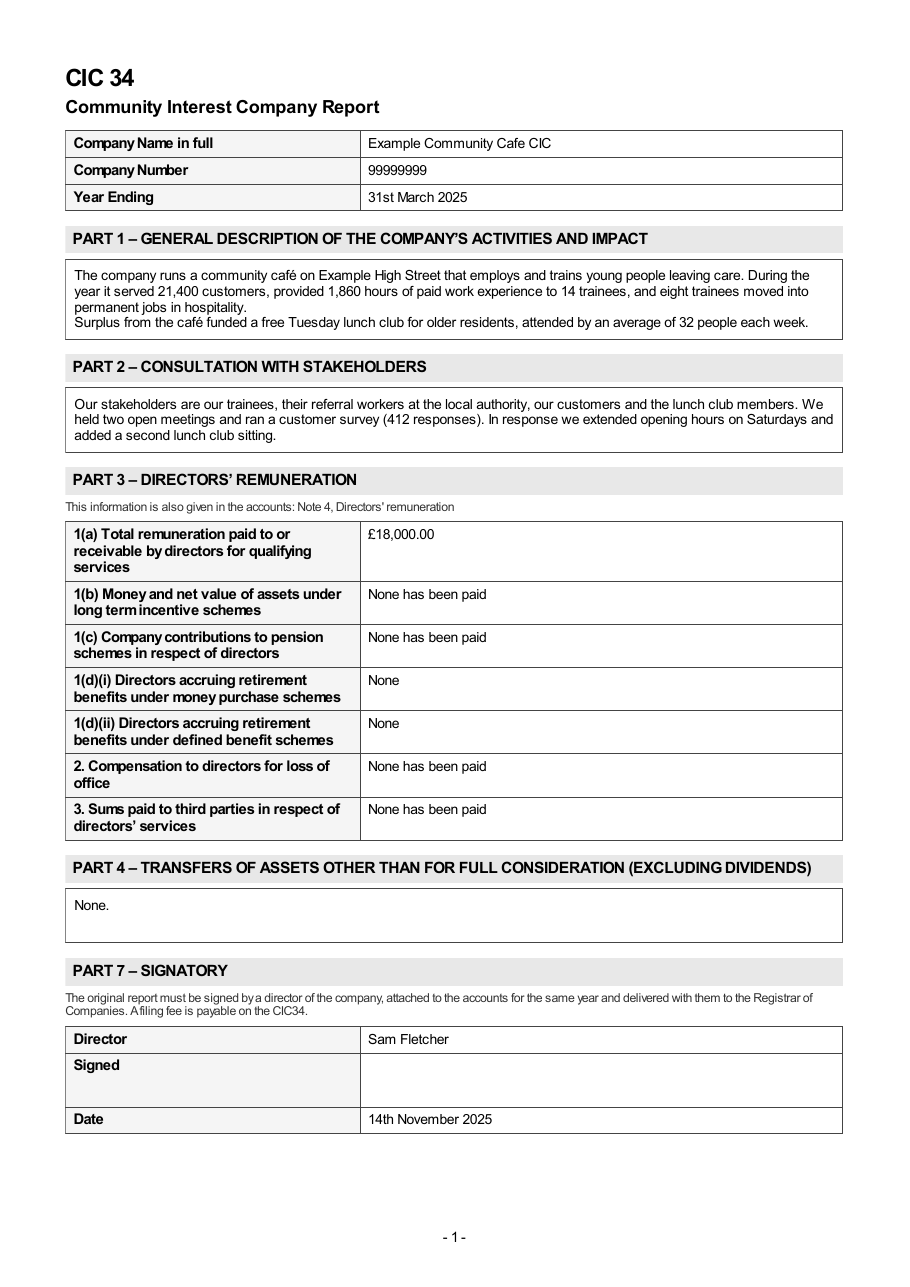
- Print it and have a director sign it. The original must carry a director’s signature.
- Deliver it to Companies House with the accounts for the same year. The CIC34 has its own filing fee (£15 on the Regulator’s current form). The form directs you to attach it to the accounts and send both to Companies House, Crown Way, Cardiff CF14 3UZ.
Tax Optimiser prepares the CIC34 but does not send it. The report is not part of the accounts submission Tax Optimiser makes to Companies House, and it is never sent to HMRC with the CT600. If you file the accounts electronically, check with Companies House or the CIC Regulator (cicregulator@companieshouse.gov.uk) how they want the CIC34 delivered to accompany them, so the two are matched on the public record.
Each year
When you create the next accounting period, the CIC setting carries forward and the new period gets its own blank CIC34, again with the signing director filled in. The Corporation Tax return and the accounts follow the normal company journey every year.
Related: Corporation Tax: getting started · Statutory accounts · Corporation Tax for a CIO · Corporation Tax for a club or association · Corporation Tax for charities and CASCs (CT600E).